● LIVE·Scoring: PNL or PMC·Free tournaments on the demo account·One tournament at a time·Only closed trades count·Demo fee 0.08% per round trip·Age 18+· ● LIVE·Scoring: PNL or PMC·Free tournaments on the demo account·One tournament at a time·Only closed trades count·Demo fee 0.08% per round trip·Age 18+·
BuyCrypt
Tournaments nowReal tournaments running in the app right now.
All tournaments →
GUIDE · TOURNAMENTS Updated Oct 11, 2026 · app 3.9.5

Complete guide to
BuyCrypt tournaments.

How BuyCrypt tournaments work in the current app: the lists, the card, how to join, how PNL and PMC results are counted, Tour Pass, the leaderboard, the rules and the prizes. Every step is a real screenshot with the parts you need outlined and numbered.

The short version
  1. 1Sign in with Apple or Google. Free tournaments run on the demo account, so there is nothing to deposit.
  2. 2Open Tournaments, pick one in Soon or Live and check its Entry and Rewards.
  3. 3Tap Join tour, check the account and confirm.
  4. 4Trade the tournament pair. Only closed trades count; places and prizes are settled automatically after the finish.
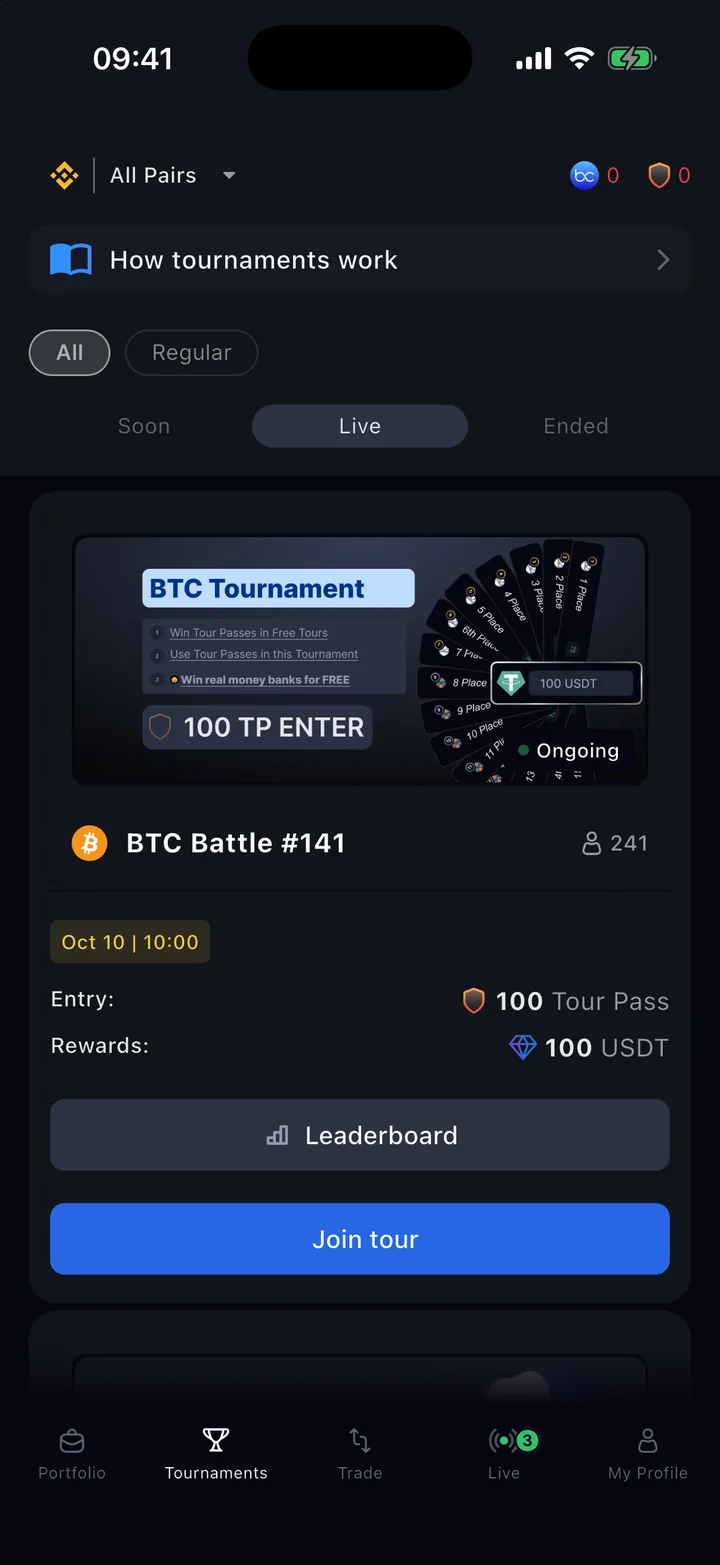
BuyCrypt Tournaments tab with the BTC Battle card: entry 100 Tour Pass, rewards 100 USDT, Leaderboard and Join tour buttons
Before you start

Free to play. No deposit.

Free tournaments are played on the demo account with Demo USDT at real market prices. You need no deposit and no exchange account; you can lose nothing but demo money.

Read the card

Know what you play for.

Prizes come in different currencies: Tour Pass, Demo USDT, BUYT or USDT. The Rewards line on every card tells you which. Only BUYT and USDT are worth money outside the game.

Contents

12 steps, from the list to the prize.

The numbers on the screenshots match the numbered lines under each one. Tap any screenshot to open it full size.

AHow it works
01 Tournaments tab

Everything starts on one tab.

Tap Tournaments, the second icon in the bottom bar. Guests can browse every list; joining needs a free account (step 06).

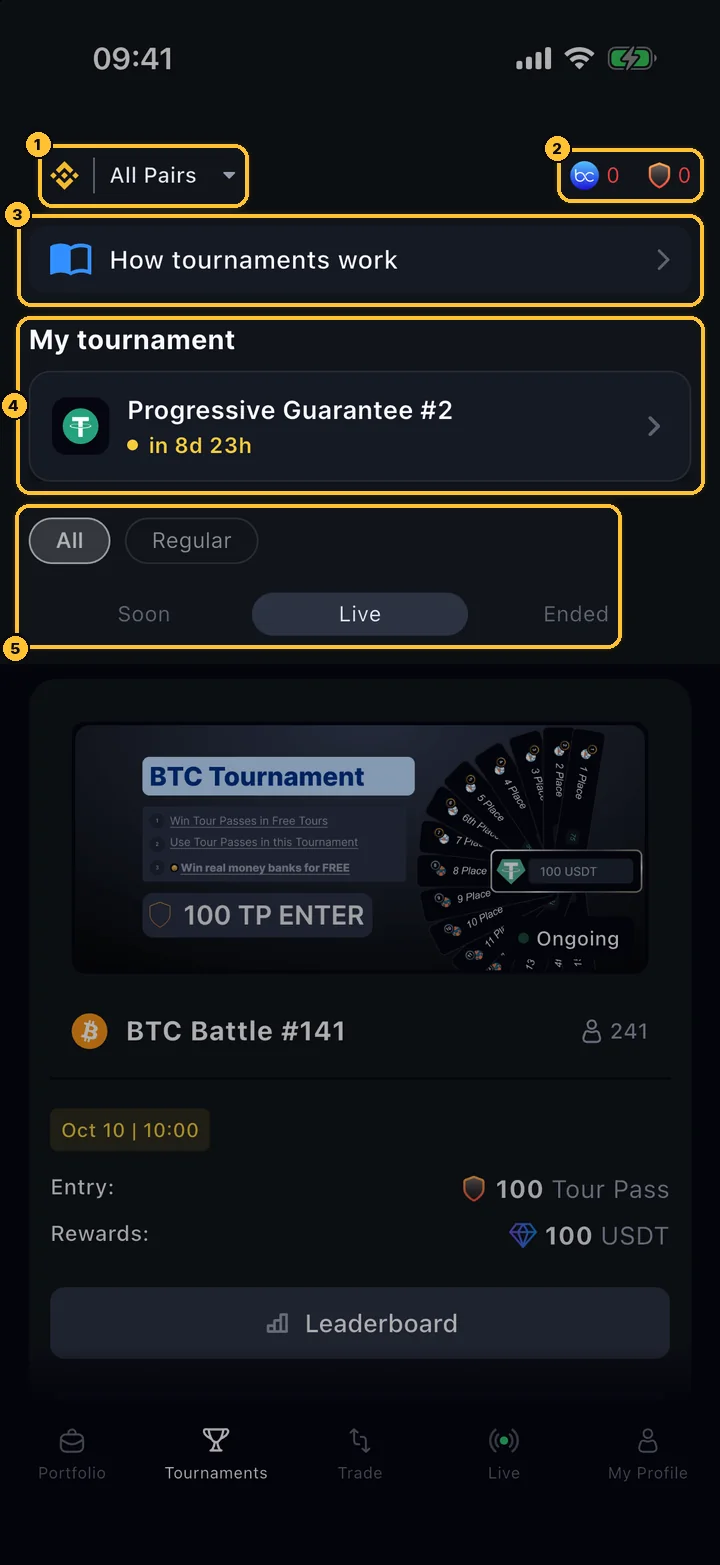
Tournaments tab: pair filter, BUYT and Tour Pass balances, How tournaments work, My tournament, category chips and the Soon, Live and Ended lists
Tournaments

The top of the tab

Below these controls are the tournament cards of the chosen list (step 04). Pull the list down to refresh it.

  1. 1Pair filter: All Pairs or the tournaments of one coin.
  2. 2Your BUYT and Tour Pass balances. Tap Tour Pass to buy more (step 07), BUYT to top up.
  3. 3How tournaments work: the short guide inside the app (step 02).
  4. 4My tournament: tournaments you joined that have not ended yet, with the time to the start or your place. Tap to open.
  5. 5Categories (All, Regular and others; empty ones are hidden) and three lists: Soon — not started yet, Live — running, Ended — finished, with results.

The tab opens on Live, or on Soon when nothing is running. You can join a Live tournament too: your result is counted from the moment you join.
02 In-app guide

The app explains itself.

How tournaments work collects the nearest free start, the schedule, the scoring and the rules on one screen. New accounts see it once automatically.

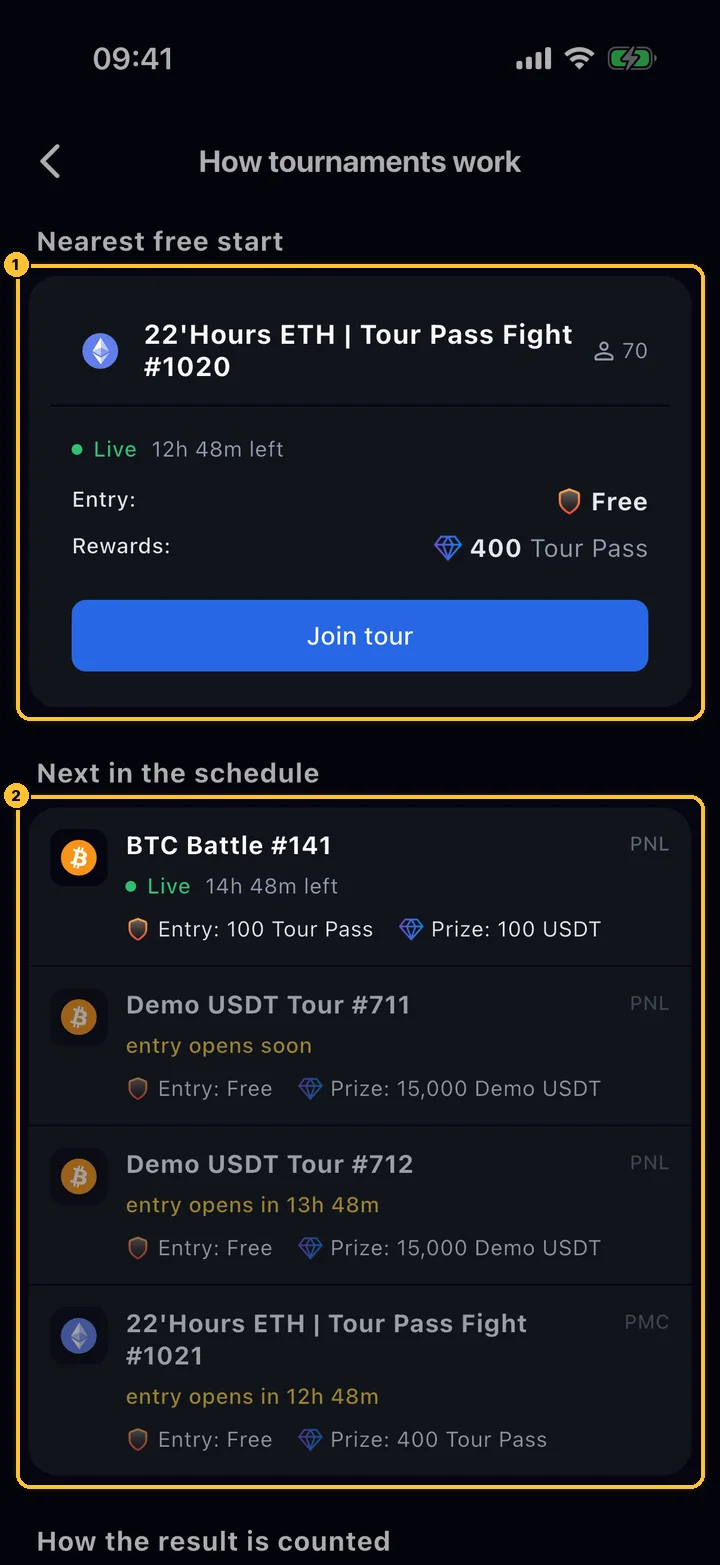
How tournaments work: Nearest free start with a Join tour button and the Next in the schedule list
Tournaments › How tournaments work

Nearest free start and the schedule

The fastest way into your first tournament.

  1. 1Nearest free start: the closest tournament with free entry, with its prize and a Join tour button.
  2. 2Next in the schedule: upcoming and running tournaments with entry, prize and the scoring (PNL or PMC) on the right.
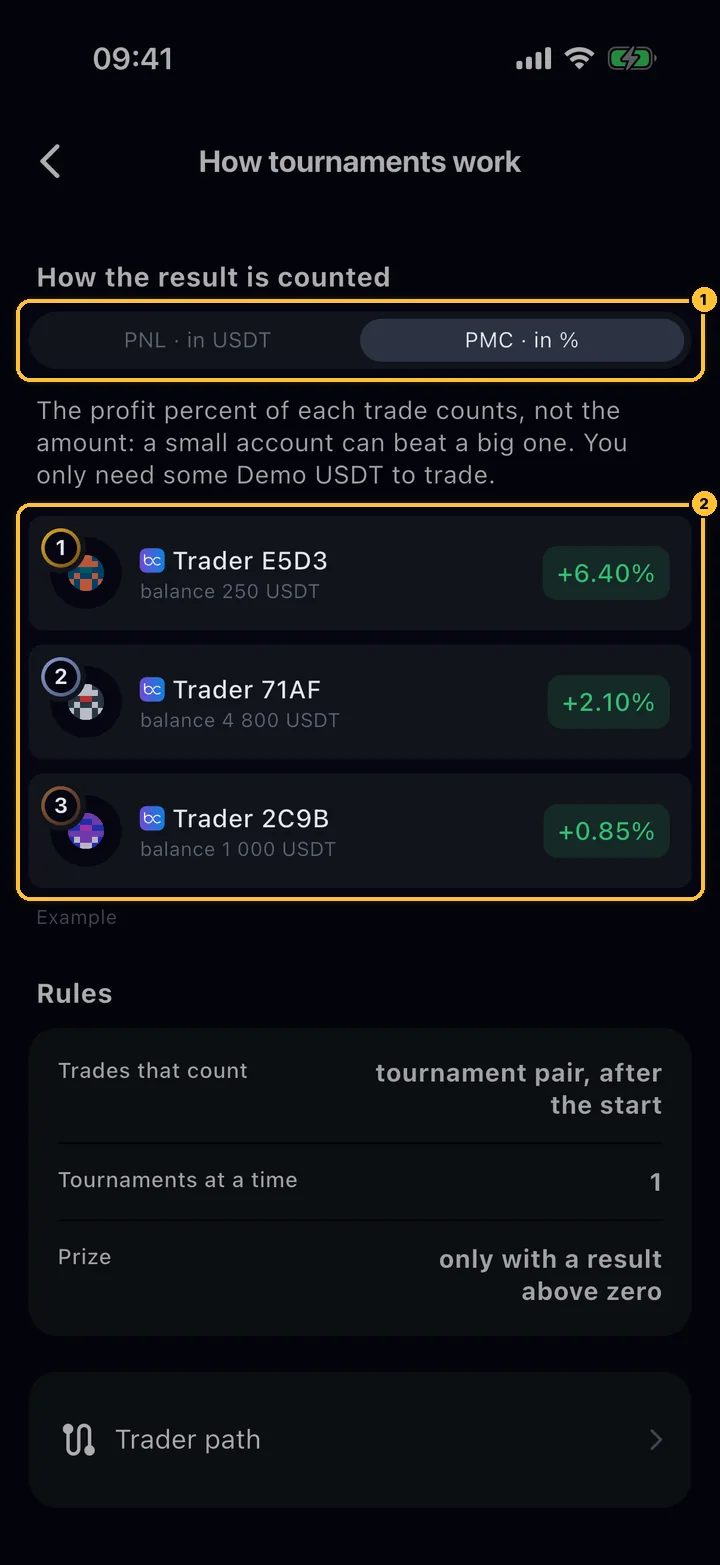
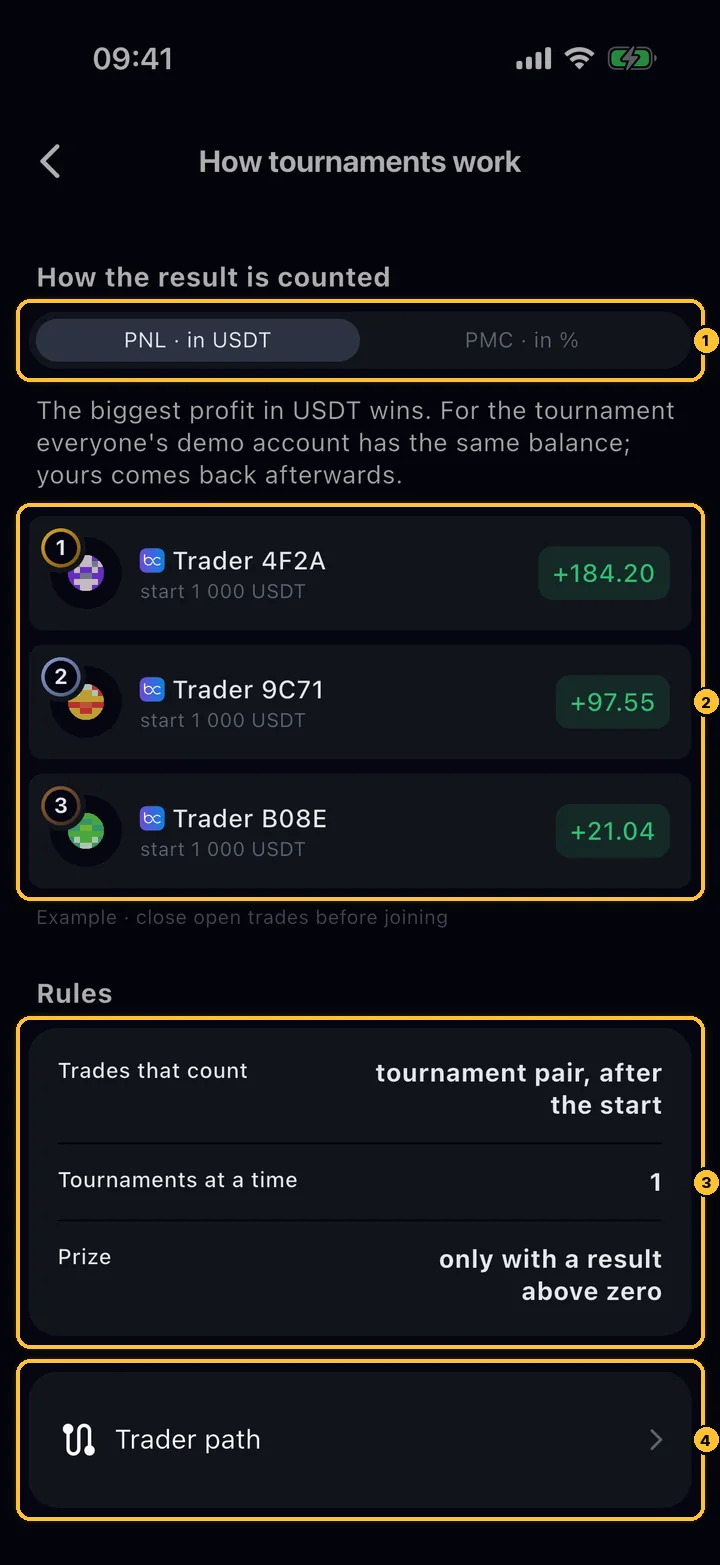
How the result is counted switch on PNL, an example leaderboard, the Rules block and Trader path
Tournaments › How tournaments work

How the result is counted, and the rules

Scroll down for the scoring and the three rules that matter most.

  1. 1The switch between PNL · in USDT and PMC · in % (step 03).
  2. 2An example leaderboard for the chosen scoring.
  3. 3Rules: only trades on the tournament pair, after the start count; 1 tournament at a time; a prize needs a result above zero.
  4. 4Trader path: your road from the first trade to USDT prizes (step 11).
03 Scoring

Two ways to count. Know which one you play.

Every tournament is either PNL or PMC. Both count only closed trades on the tournament pair; an open position adds nothing until you close it.

How the result is counted switched to PMC: an example where a 250 USDT account beats a 4,800 USDT account
Tournaments › How tournaments work › PMC

PMC: the percent, not the amount

In a PMC tournament a small account can beat a big one: the leaderboard compares percentages.

  1. 1PMC · in % selected.
  2. 2The example: the trader with a 250 USDT balance is first with +6.40%, ahead of a 4,800 USDT balance with +2.10%.
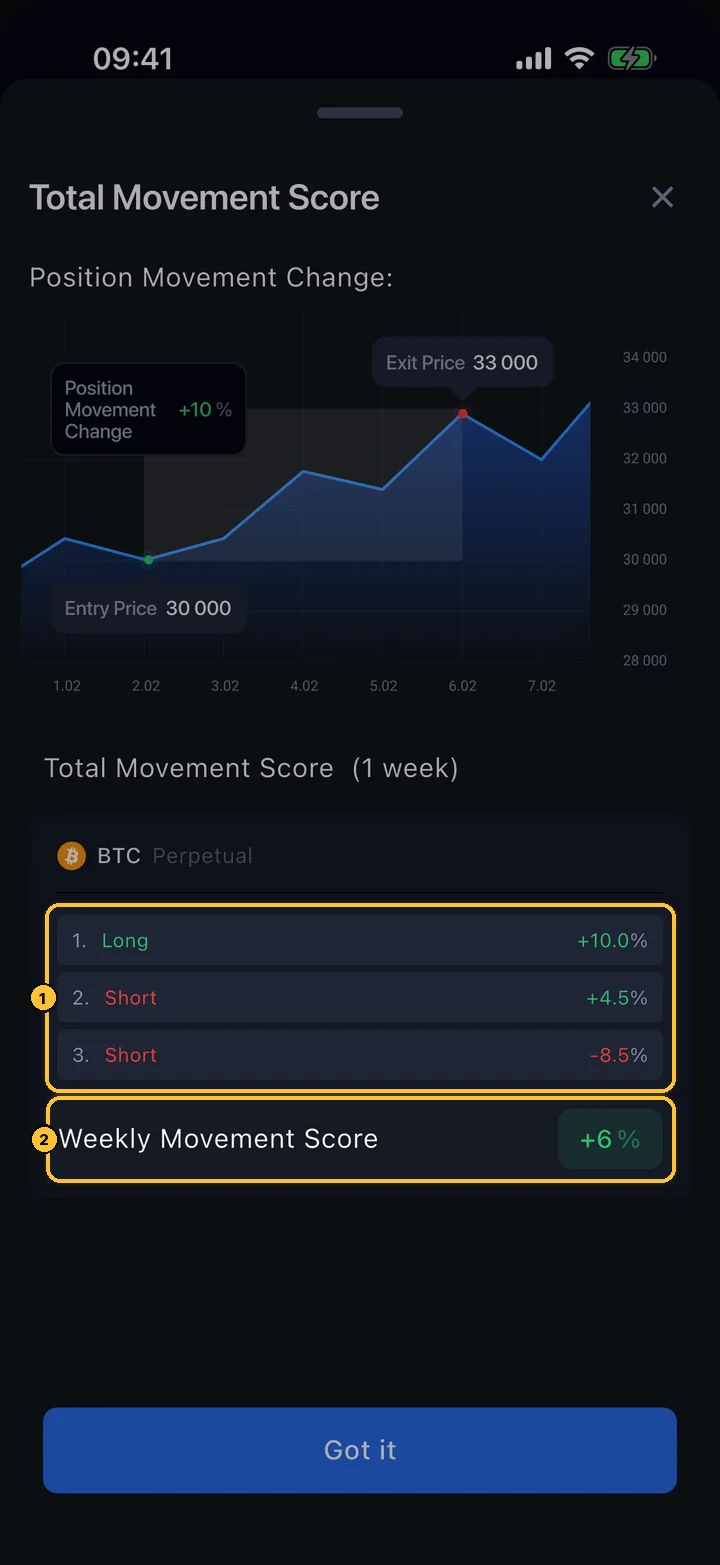
Total Movement Score sheet: three closed positions of +10%, +4.5% and −8.5% add up to a weekly score of +6%
Leaderboard › Score ?

How PMC adds up

On a PMC leaderboard, the ? next to the score column opens this explanation.

  1. 1Each closed position gets the percentage move of the price from entry to exit, in the direction of the trade: a short earns when the price falls.
  2. 2The results of all closed positions are added up: +10% + 4.5% − 8.5% = +6%.
PNL
PMC
What counts
The profit of closed trades in USDT
The percentage price move of each closed trade, added up
Size and leverage
Matter: a bigger position wins or loses more
Do not matter: 2% is 2% on any size and any leverage
Starting balance
The same demo balance for everyone; yours comes back after the end
Your usual demo balance; you only need some Demo USDT to trade
Example
Closed trades +250, −80 and +14.2 USDT = +184.20
Long ETH at 2,500, closed at 2,550: +2.00% move, +1.92% after the demo fee
Shown as
Score, in USDT
PMC Score, in %

On the demo account every trade pays a fee of 0.04% of its value when it opens and 0.04% when it closes, about 0.08% per round trip. It is taken from both the PNL and the PMC result, so many tiny trades cost more than they earn.

BChoosing and joining
04 Tournament card

Read the card before you play.

Every card answers four questions: which coin, when, what it costs and what you can win.

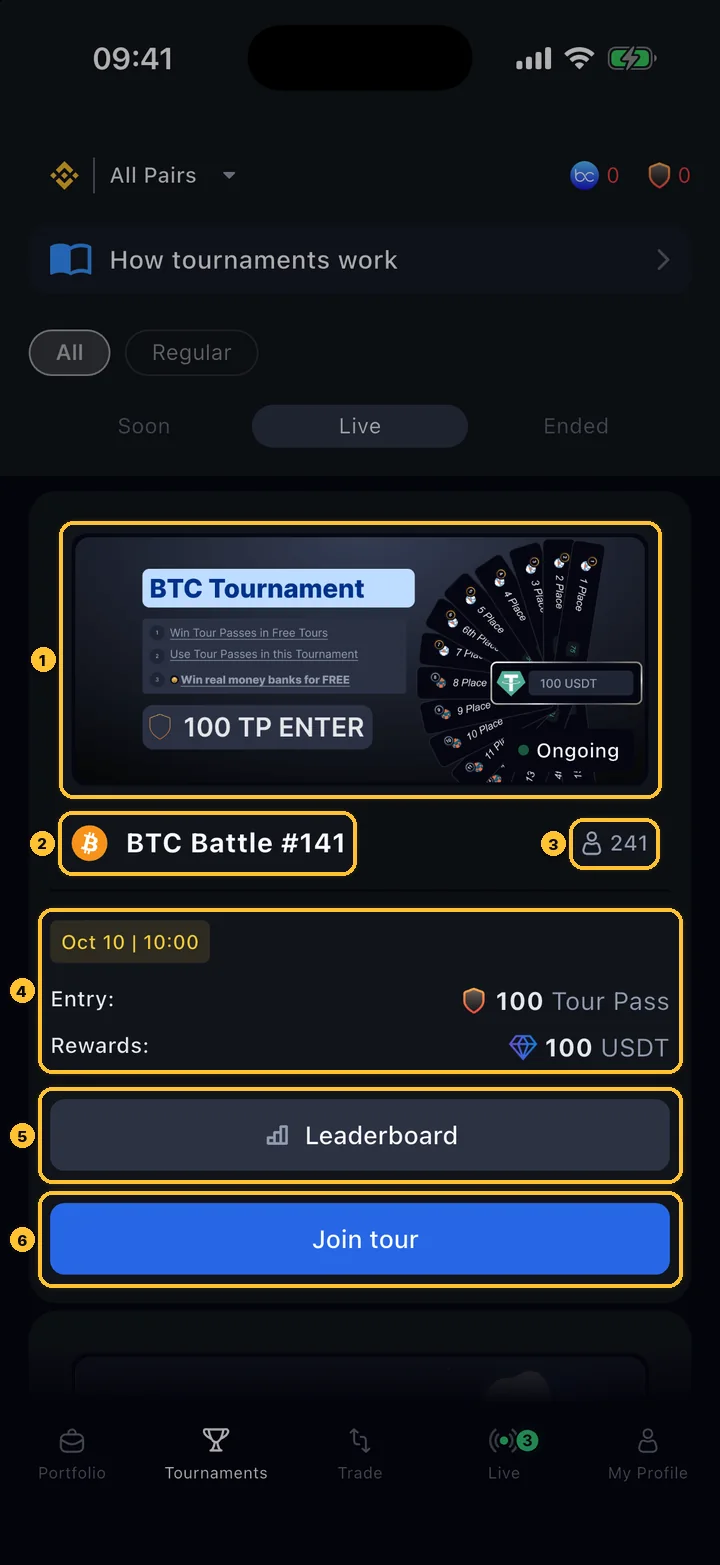
BTC Battle #141 card: cover, coin and name, 241 participants, start date, entry 100 Tour Pass, rewards 100 USDT, Leaderboard and Join tour
Tournaments › Live

A tournament card

Tap the card or Leaderboard to look inside before you join.

  1. 1Cover with the status: New, Ongoing, Ended or Awaiting result. Special categories carry a badge here, and some tournaments a minimum rating (for example Gold 1500+).
  2. 2The coin that counts and the name with its number in the series.
  3. 3Participants. Until the minimum is reached it is shown as joined/minimum.
  4. 4Start date (a countdown in the last 24 hours, Waiting for participants if the minimum is not reached yet); Entry — Free, Tour Pass or BUYT; Rewards — the prize pool and its currency.
  5. 5Leaderboard: prizes, description and participants (step 05).
  6. 6Join tour: start joining (step 06). After you join it turns into You're in.
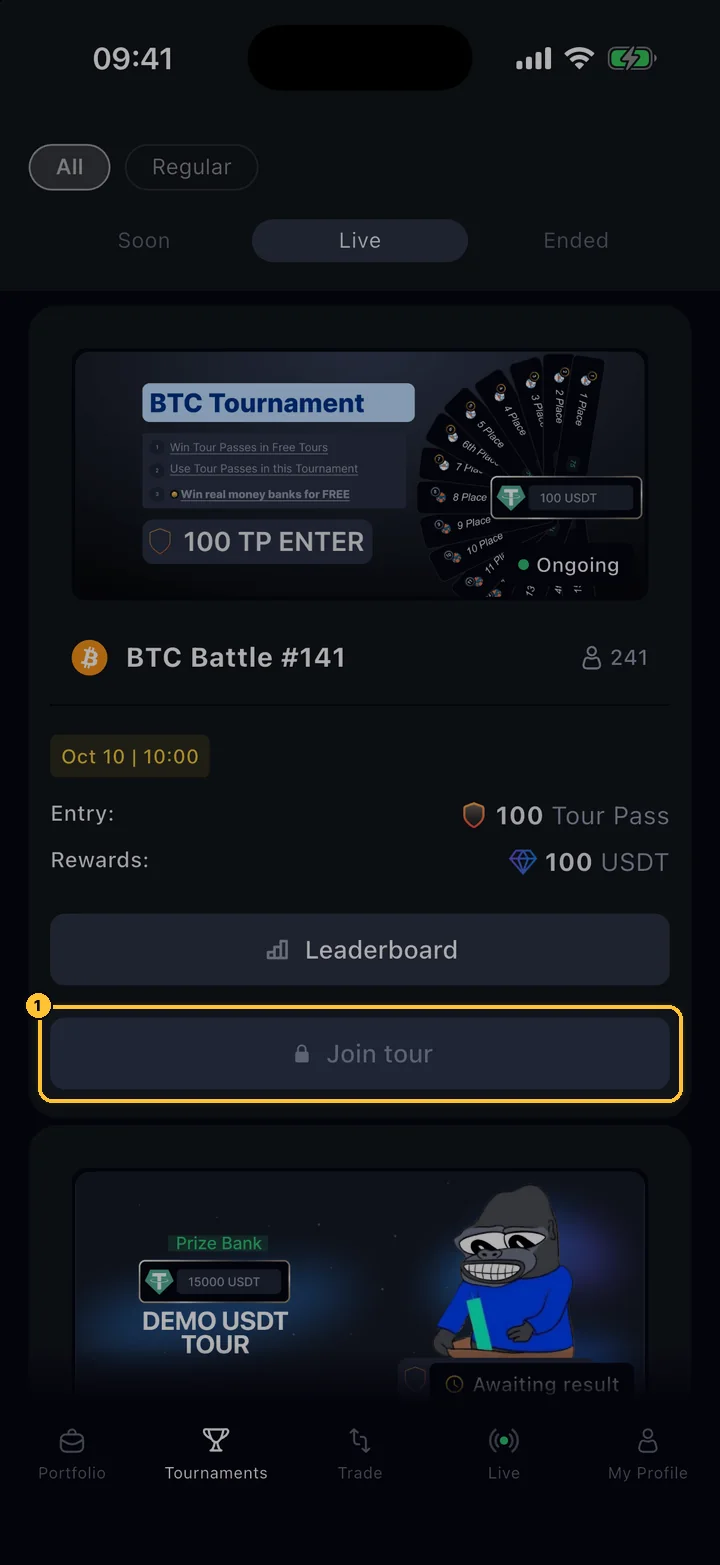
A card with a locked Join tour button because the user already plays another tournament
Tournaments › Live

One tournament at a time

If you already take part in a tournament that has not ended, Join tour on other cards is locked.

  1. 1The locked button. It unlocks when your current tournament ends.

Ended cards have Show details instead of the buttons and open the results (step 10). When registration is over, the card says Registration is closed.

05 Leaderboard

See the prizes and the players.

The leaderboard is open to everyone, before and during the tournament. Use it to check the prizes, the rules written by the organiser and the players you will meet.

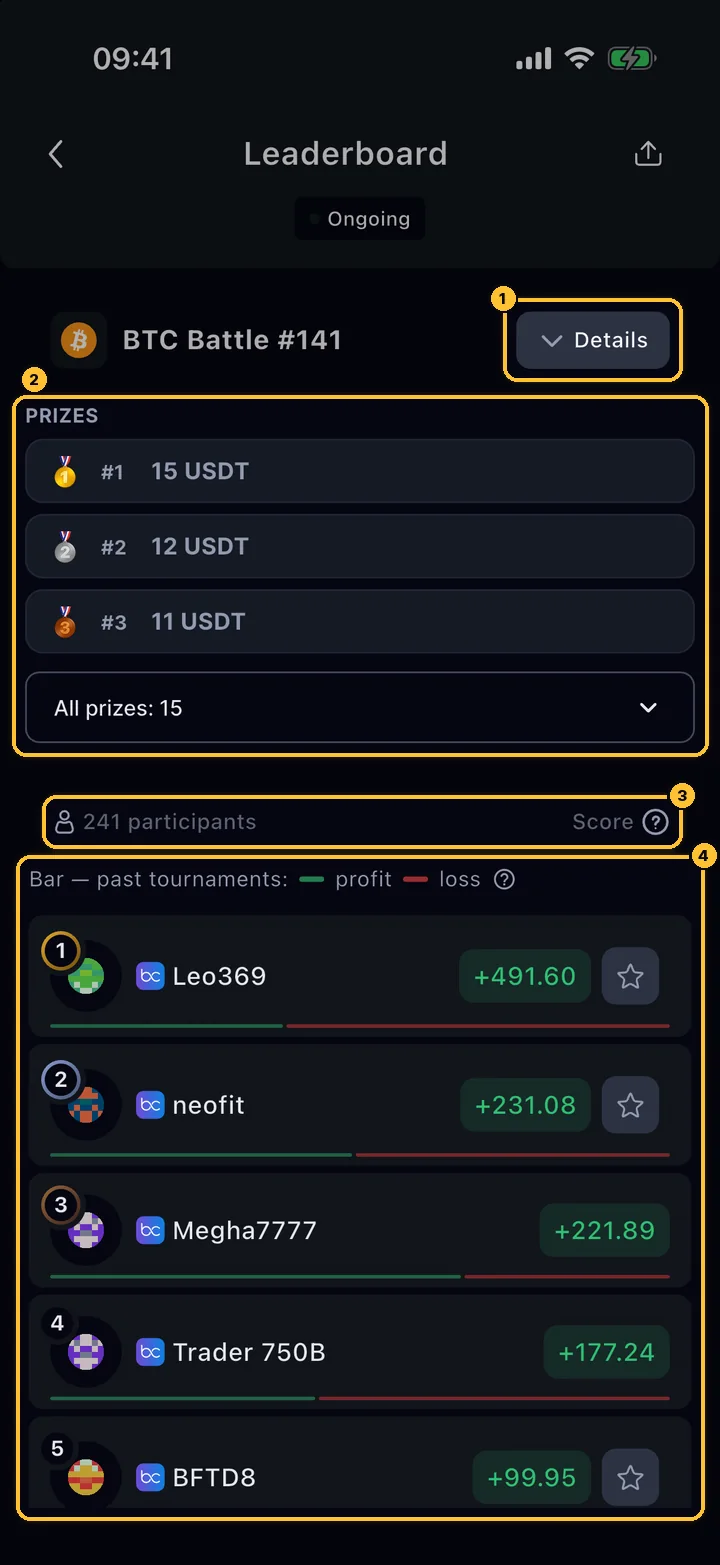
Leaderboard of BTC Battle #141: Details button, prizes for places 1–3 with All prizes: 15, participant count and Score help, and the ranked list
Card › Leaderboard

The leaderboard

The list updates by itself during the tournament (about once a minute); pull it down to refresh. If you are signed in and not playing yet, the bar at the bottom has Join and Chat (the tournament chat).

  1. 1Details: the current reward, the time left and the tournament description.
  2. 2Prizes: the first three places; All prizes opens the full list (15 paid places here).
  3. 3The number of participants and the scoring: Score (PNL, USDT) or PMC Score (%). ? explains it.
  4. 4Participants by place: rank, name, result and a star to add the trader to favourites. The bar under each row shows their previous tournaments: green ended in profit, red in loss. Your own row is highlighted.
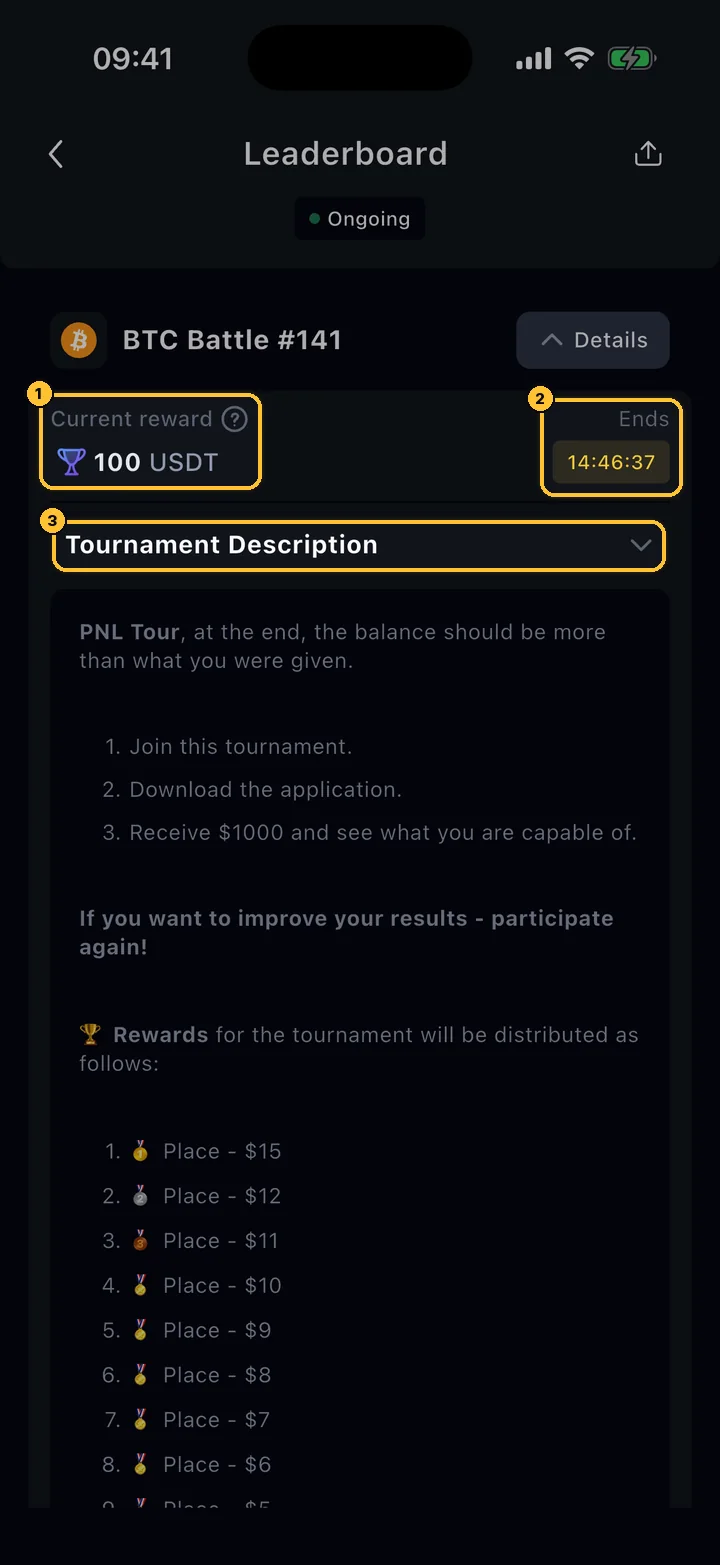
Details expanded: Current reward 100 USDT, Ends countdown and Tournament Description
Leaderboard › Details

Details

Read the description: the organiser lists the prizes and any extra conditions there.

  1. 1Current reward: the prize pool now.
  2. 2Ends: time left (before the start: the start time).
  3. 3Tournament Description: tap to fold or unfold.
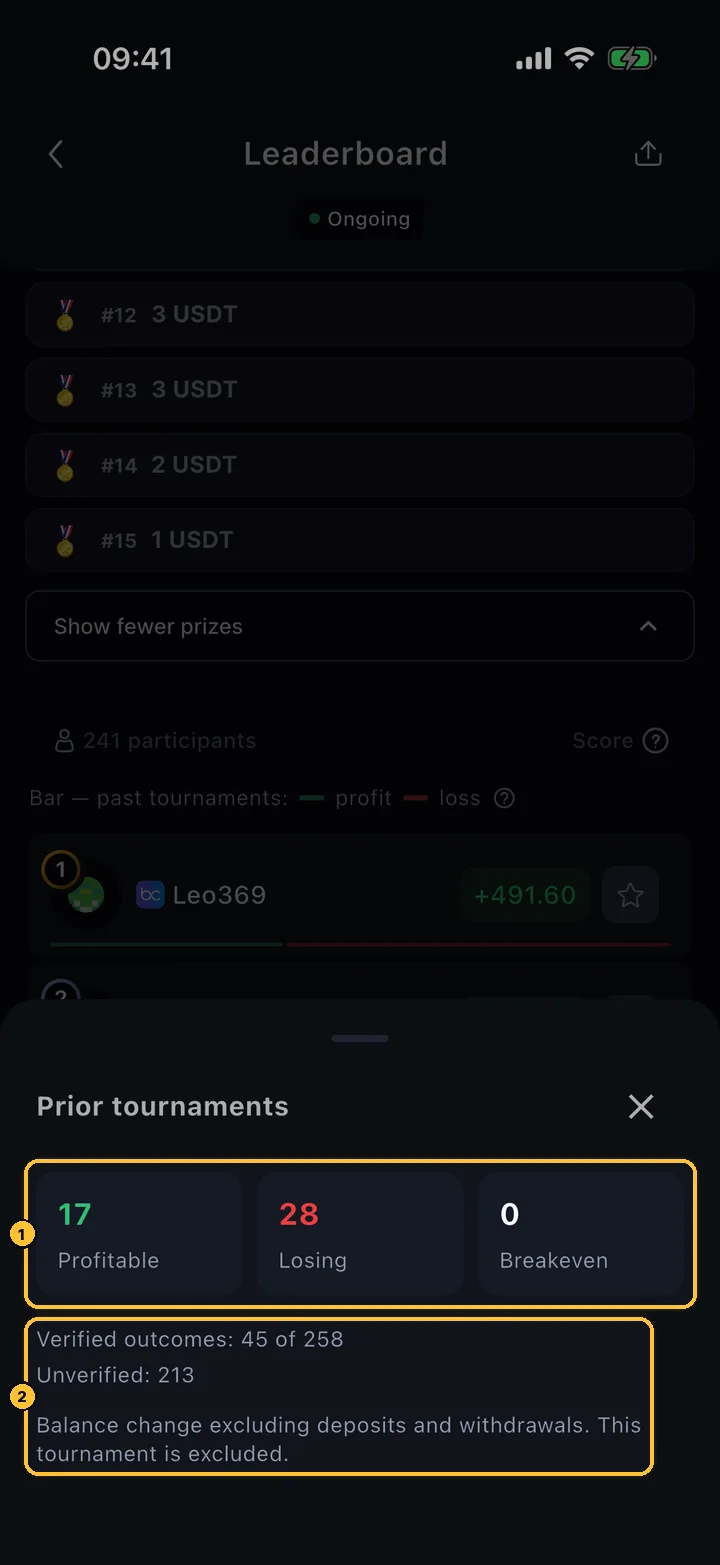
Prior tournaments sheet: 17 profitable, 28 losing, 0 breakeven; verified outcomes 45 of 258
Leaderboard › tap the bar under a player

A player's record

Tap the bar under a participant to see the numbers behind it.

  1. 1How many of their earlier tournaments ended in profit, in loss and at zero.
  2. 2How many of those results are verified. The current tournament is not included.
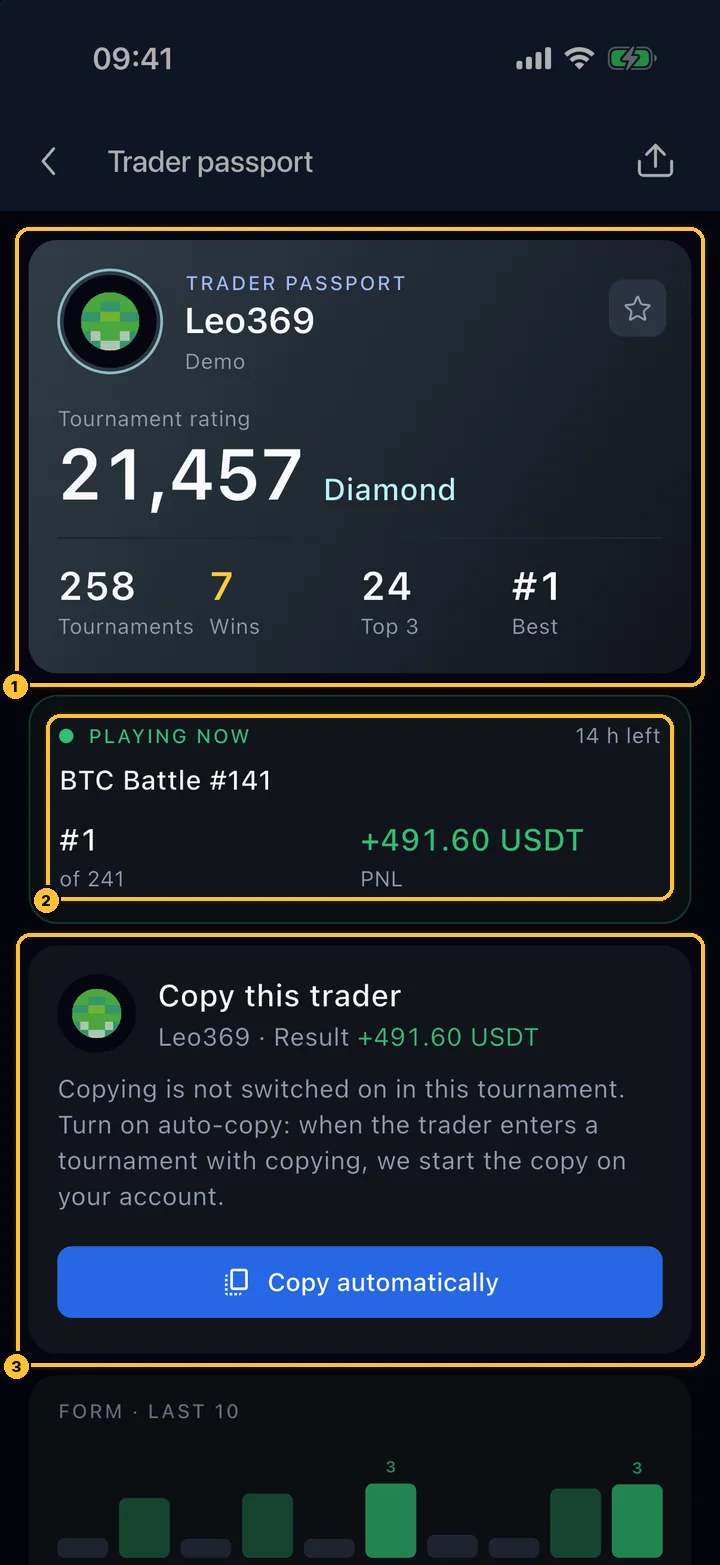
Trader passport of Leo369: tournament rating 21,457 Diamond, PLAYING NOW BTC Battle #141 place 1 of 241, Copy this trader card
Leaderboard › tap a player

Trader passport

Tap a player to open their passport.

  1. 1Tournament rating with its tier, the number of tournaments, wins, top-3 places and the best place.
  2. 2Playing now: place and result in the current tournament.
  3. 3Copy this trader: copy their trades in tournaments where copying is on, or turn on automatic copying for their next one.
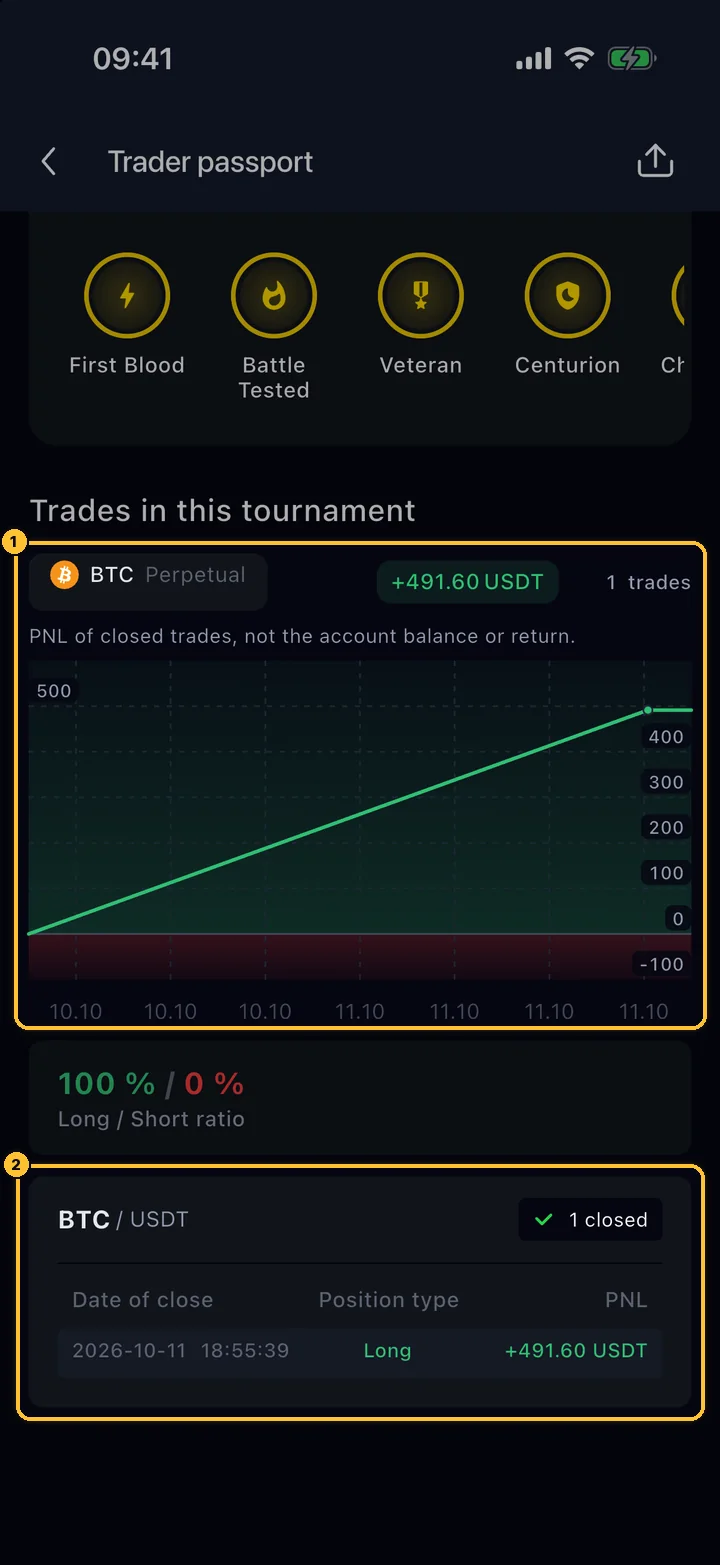
Trades in this tournament: PNL chart of closed trades, Long / Short ratio and the list of closed positions
Trader passport › scroll down

Every trade in this tournament

Lower in the passport you see how the result was made.

  1. 1Trades in this tournament: the pair, the total result, the number of trades and a chart of the result of closed trades over time.
  2. 2Every closed position with its close time, side and result. Above it: the Long / Short ratio.
06 Joining

Three taps to the start line.

Tap Join tour on a card. The app shows the conditions and the account that will play, and asks for the entry only when you confirm.

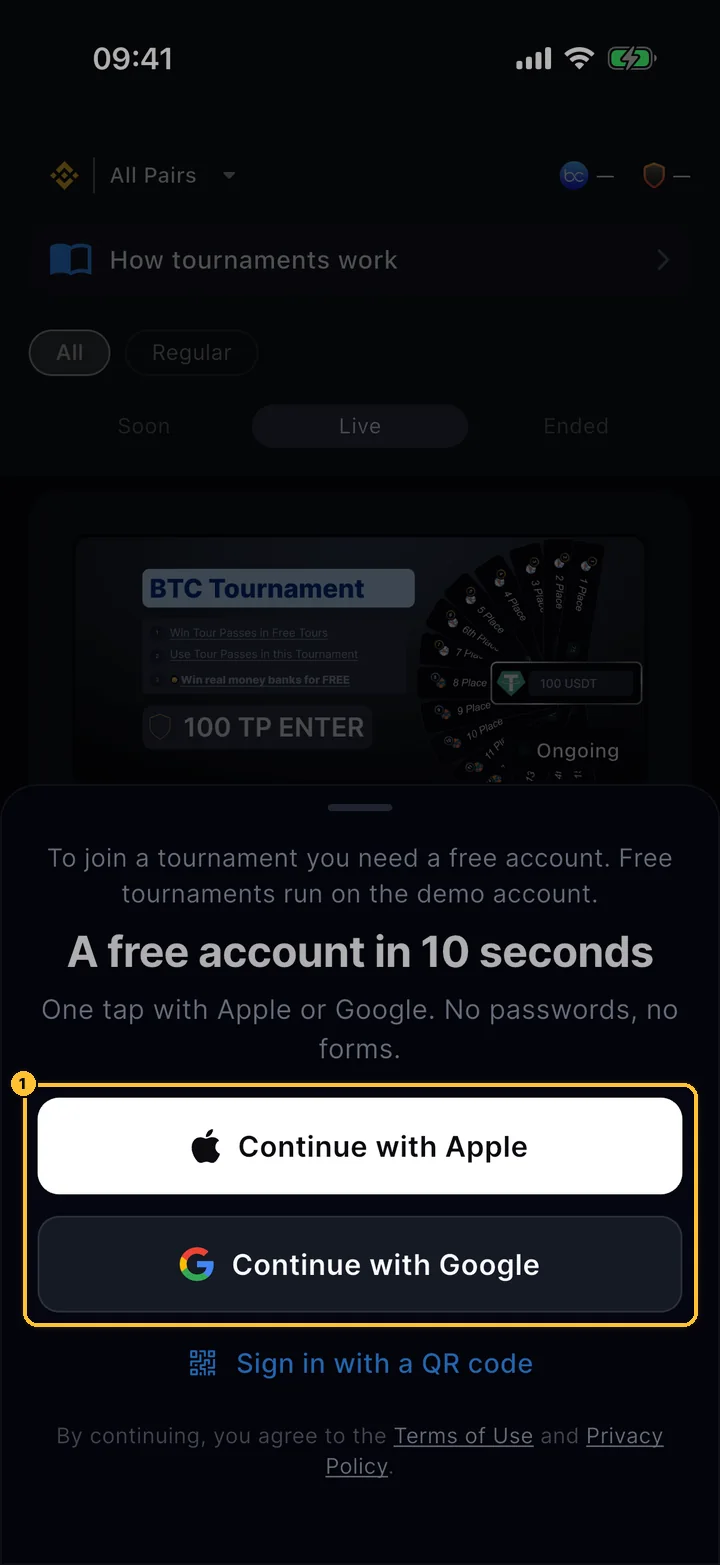
Sign-in sheet shown to a guest: Continue with Apple, Continue with Google, Sign in with a QR code
Join tour (without an account)

No account yet?

A guest who taps Create profile or Join tour gets this sheet, and after sign-in comes back to the same tournament.

  1. 1Continue with Apple or Continue with Google: one tap, no passwords or forms. A demo account is created automatically.
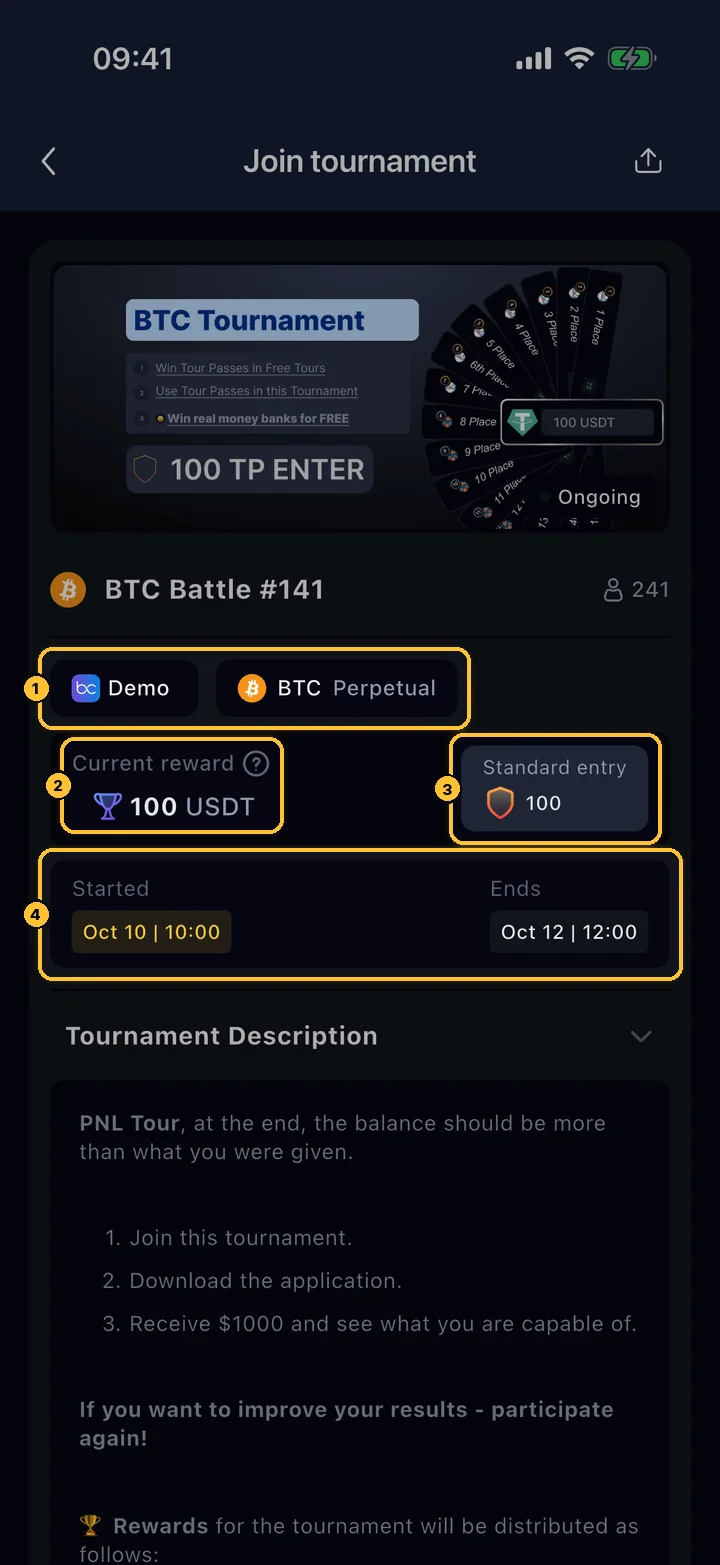
Join tournament screen: Demo account and BTC Perpetual chips, current reward 100 USDT, standard entry 100 Tour Pass, start and end dates
Card › Join tour

Join tournament: the conditions

The top half repeats the conditions; the description with the prize list follows.

  1. 1Where it is played: the account type (Demo here) and the market, BTC Perpetual.
  2. 2Current reward: the prize pool.
  3. 3Standard entry: the price, here 100 Tour Pass.
  4. 4Start and end time.
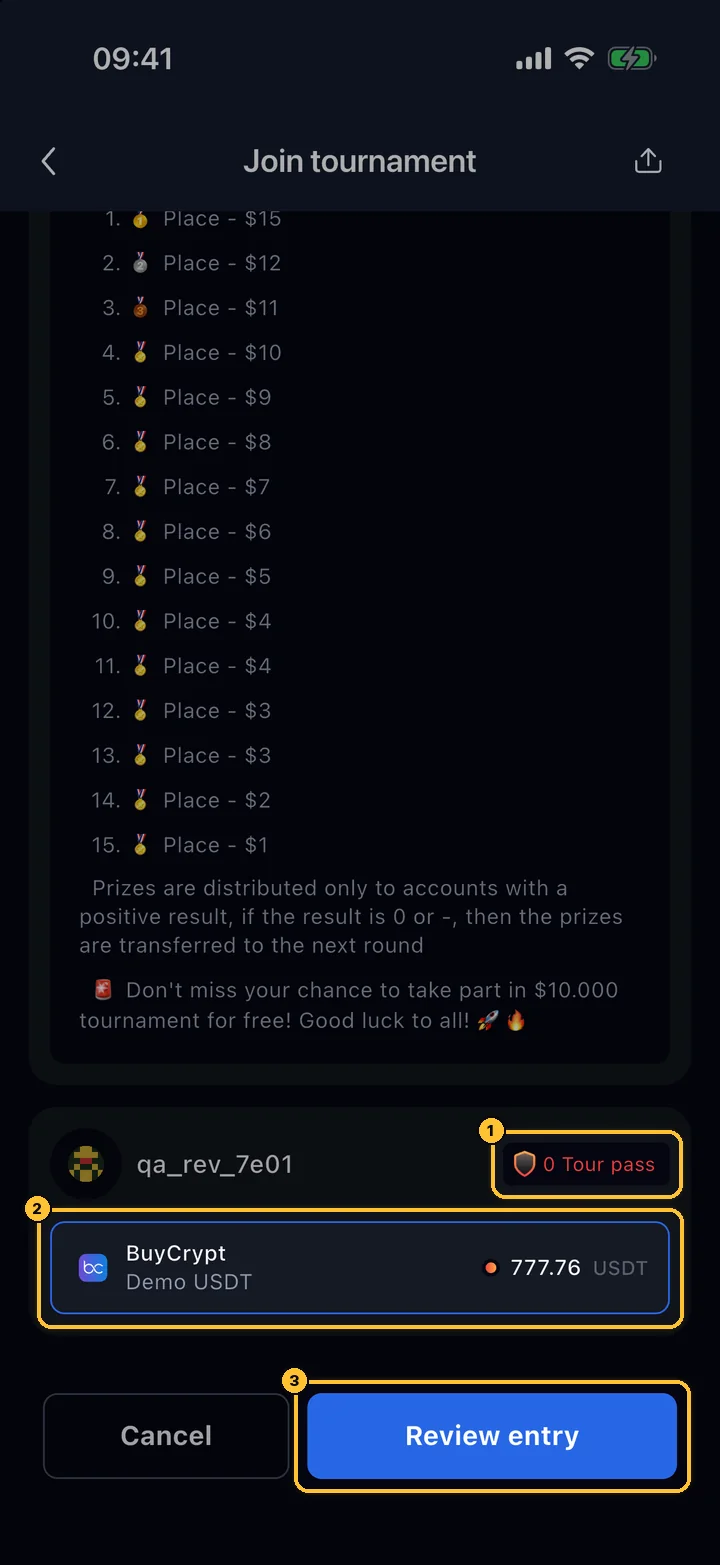
Bottom of Join tournament: Tour Pass balance chip, selected BuyCrypt Demo USDT account, Cancel and Review entry buttons
Card › Join tour › scroll down

Your account

At the bottom you see who joins and with which account.

  1. 1Your balance in the entry currency. Red means it is not enough.
  2. 2The account that will play. If several of your accounts fit, tap to choose; accounts that do not fit this tournament are listed separately.
  3. 3Review entry for a paid entry (Join tour for a free one).

An account that is copying another trader cannot join a tournament: choose another account or stop copying first.

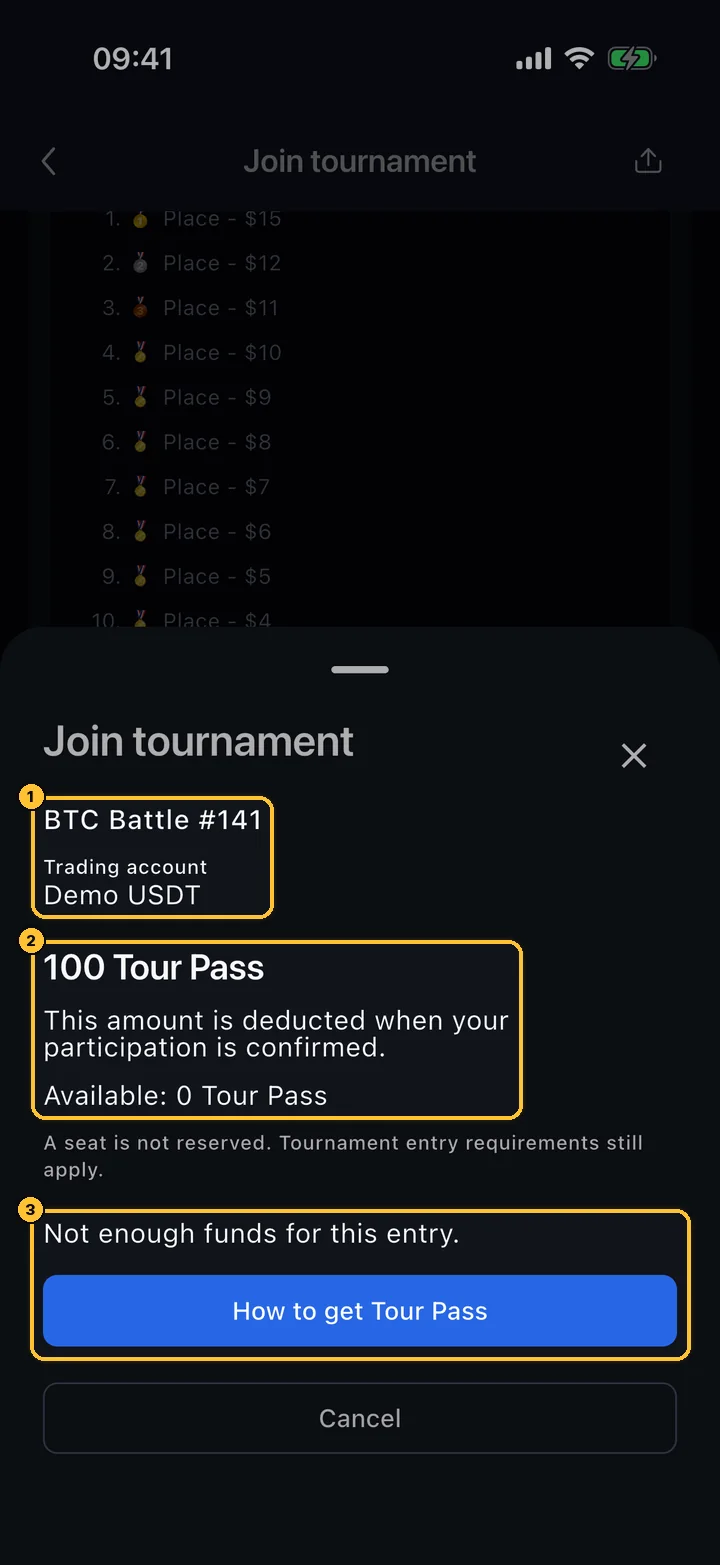
Join tournament confirmation: BTC Battle #141, Demo USDT account, 100 Tour Pass, not enough funds and How to get Tour Pass
Review entry

Confirm and pay

Nothing is charged until this last step.

  1. 1The tournament and the trading account.
  2. 2The entry and your available balance. It is deducted only when your participation is confirmed.
  3. 3With enough balance the button reads Pay … and join (or Join for free). Without it you get How to get Tour Pass (step 07).

If the entry is refused (tournament full, registration closed, wrong account type, open positions on the demo account and so on), the app says why and adds Your entry was not charged.

After you join

A You're in sheet repeats the main rule: only trades on the tournament pair opened after the start count. On the Futures tab a line reminds you which pair counts, and the pair cannot be changed while the tournament runs.

PNL on the demo account

When a demo PNL tournament starts, everyone gets the same demo balance. Close your positions and cancel your orders on that account before you join. Your usual demo balance comes back after the end.

Leaving

You can leave with Leave on the leaderboard, but only before the start, and a paid entry is not refunded when you leave. If a tournament does not get its minimum number of players, it does not start and the entry is refunded.

07 Tour Pass

The ticket to paid tournaments.

Tour Pass is the in-app ticket for tournaments with a Tour Pass entry. Some tournaments cost BUYT instead; their price is set in dollars and converted at the current BUYT rate (see BUYT entry cost).

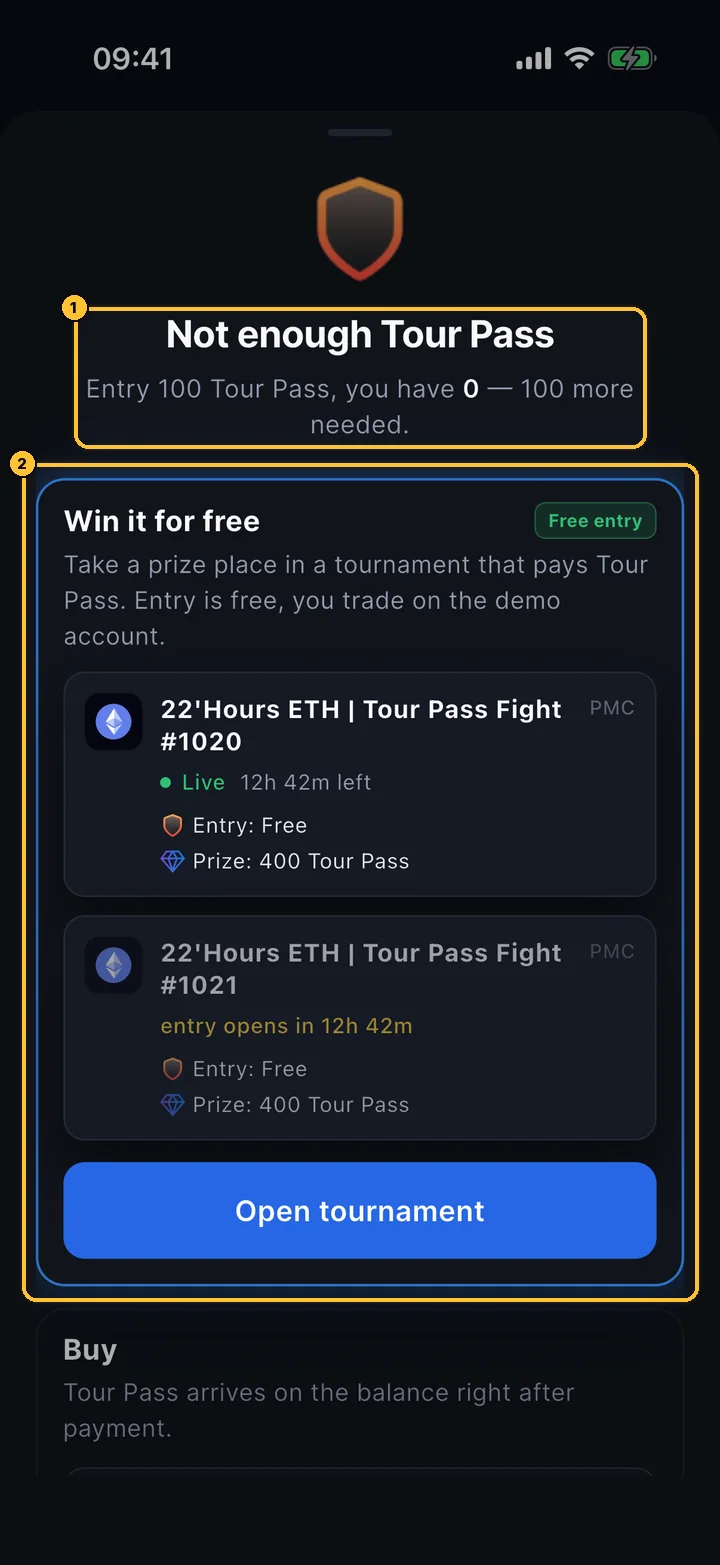
Not enough Tour Pass sheet: entry 100, you have 0; Win it for free with a free Tour Pass Fight tournament; Buy
Review entry › How to get Tour Pass

Not enough Tour Pass

The app offers two ways to get the missing passes.

  1. 1How many you have and how many are missing.
  2. 2Win it for free: free tournaments whose prizes are paid in Tour Pass. Below it: Buy Tour Pass.
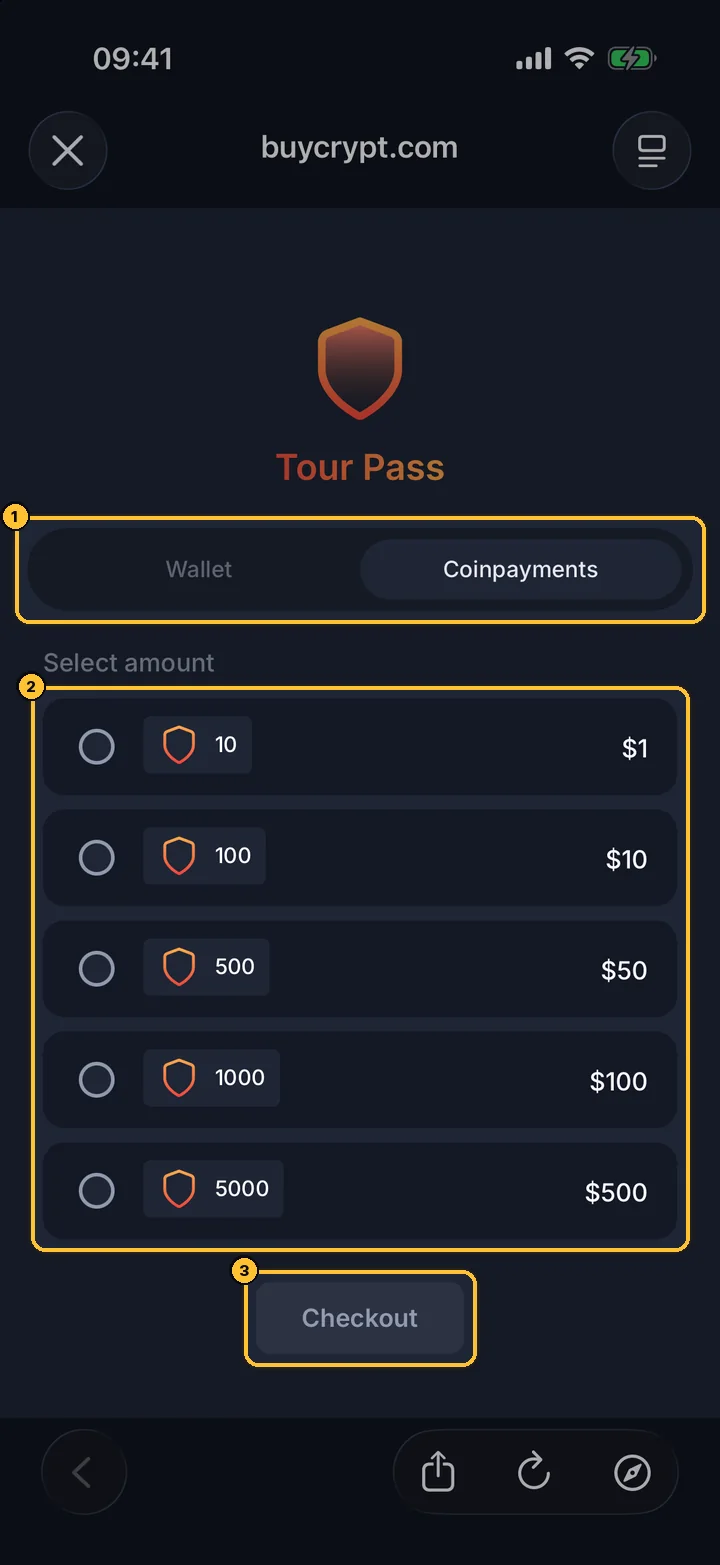
Purchase Tour Pass page: Wallet or Coinpayments, packs of 10 for $1, 100 for $10, 500 for $50, 1000 for $100, 5000 for $500, Checkout
Tour Pass balance › Purchase Tour Pass

Buying Tour Pass

Tap the Tour Pass balance at the top of the Tournaments tab. One Tour Pass costs $0.10.

  1. 1How to pay: Wallet — from the USDT you won (your rewards wallet), or Coinpayments — with crypto.
  2. 2The packs: 10 for $1, 100 for $10, 500 for $50, 1,000 for $100, 5,000 for $500.
  3. 3Checkout. The passes arrive on your balance right after payment.
CPlaying
08 Progressive Guarantee

A pool that only grows.

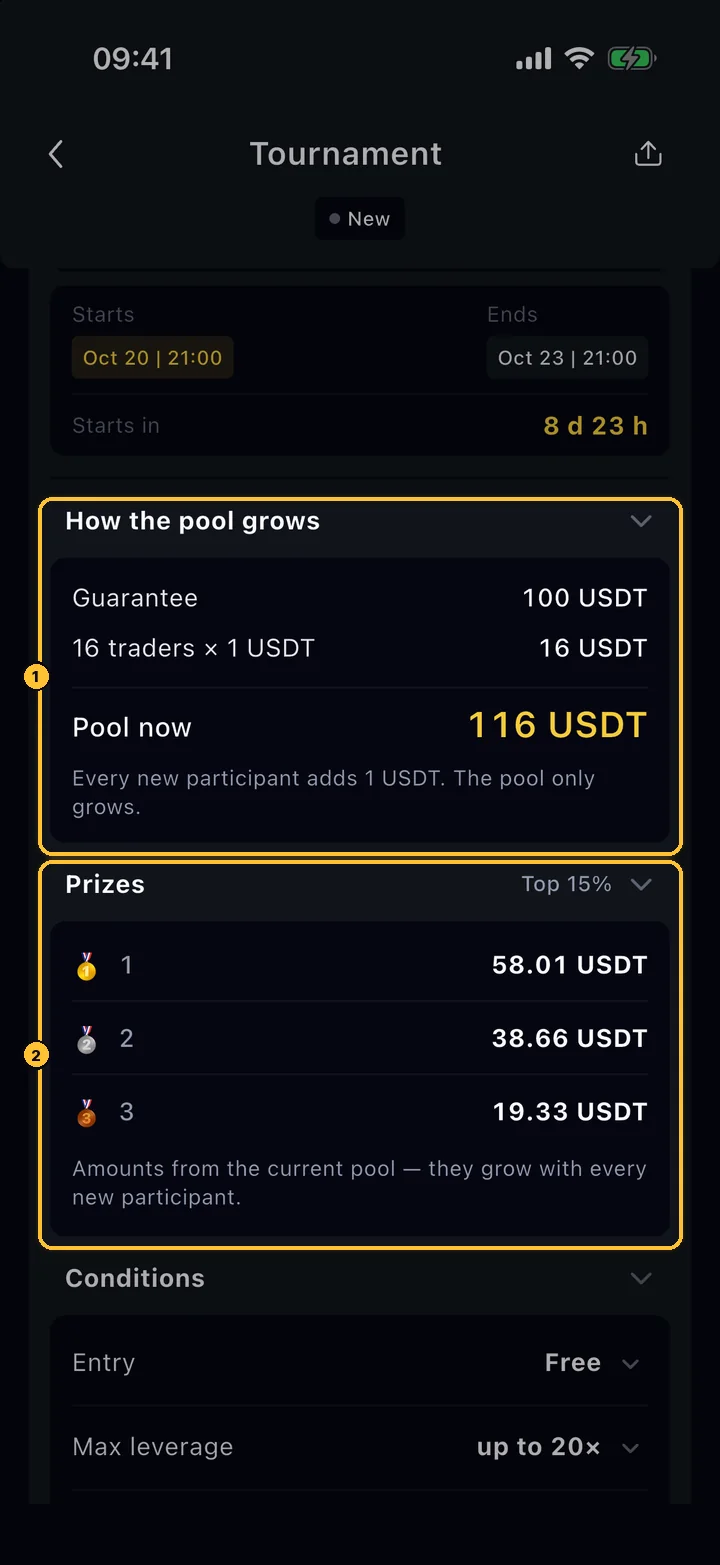
Some tournaments are Progressive Guarantee events: BuyCrypt guarantees a prize pool, and every new participant adds to it. They have their own, stricter conditions, all listed on the tournament screen.

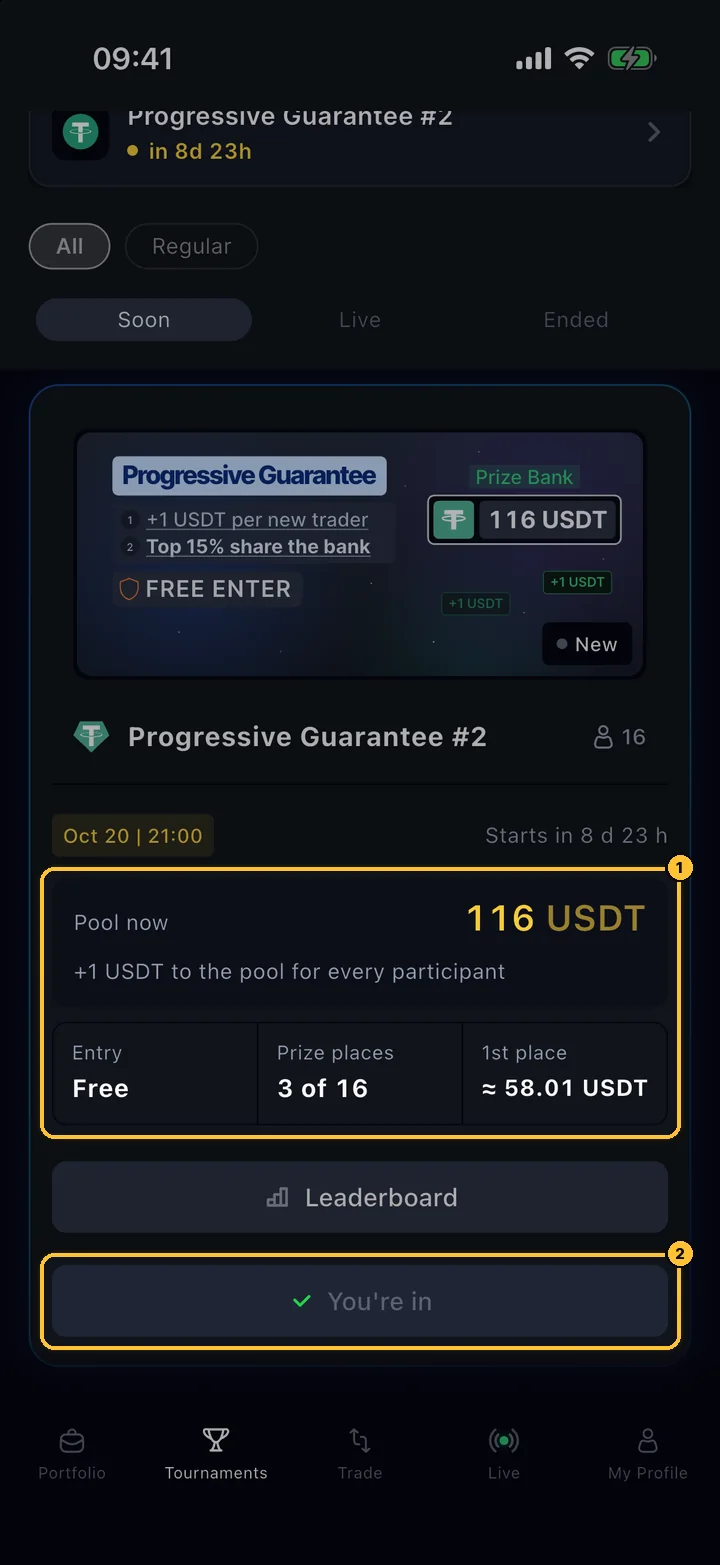
Progressive Guarantee #2 card: pool now 116 USDT, +1 USDT for every participant, entry free, prize places 3 of 16, 1st place about 58.01 USDT, You're in
Tournaments › Soon

The card

These cards have a blue glow and show the pool instead of a fixed reward.

  1. 1Pool now and how much each participant adds; Entry, Prize places (for the current number of players) and the approximate 1st place prize.
  2. 2Your status: You're in after joining.
How the pool grows: guarantee 100 USDT plus 16 traders × 1 USDT = 116 USDT; prizes for places 1–3, Top 15%
Tournaments › Progressive Guarantee card

The pool and the prizes

The amounts are an example from the current pool; places and amounts are fixed after the finish.

  1. 1How the pool grows: Guarantee + participants × the amount per participant = Pool now. The pool never goes down.
  2. 2Prizes: the best 15% of participants (at least one place), the higher the place the bigger the prize.
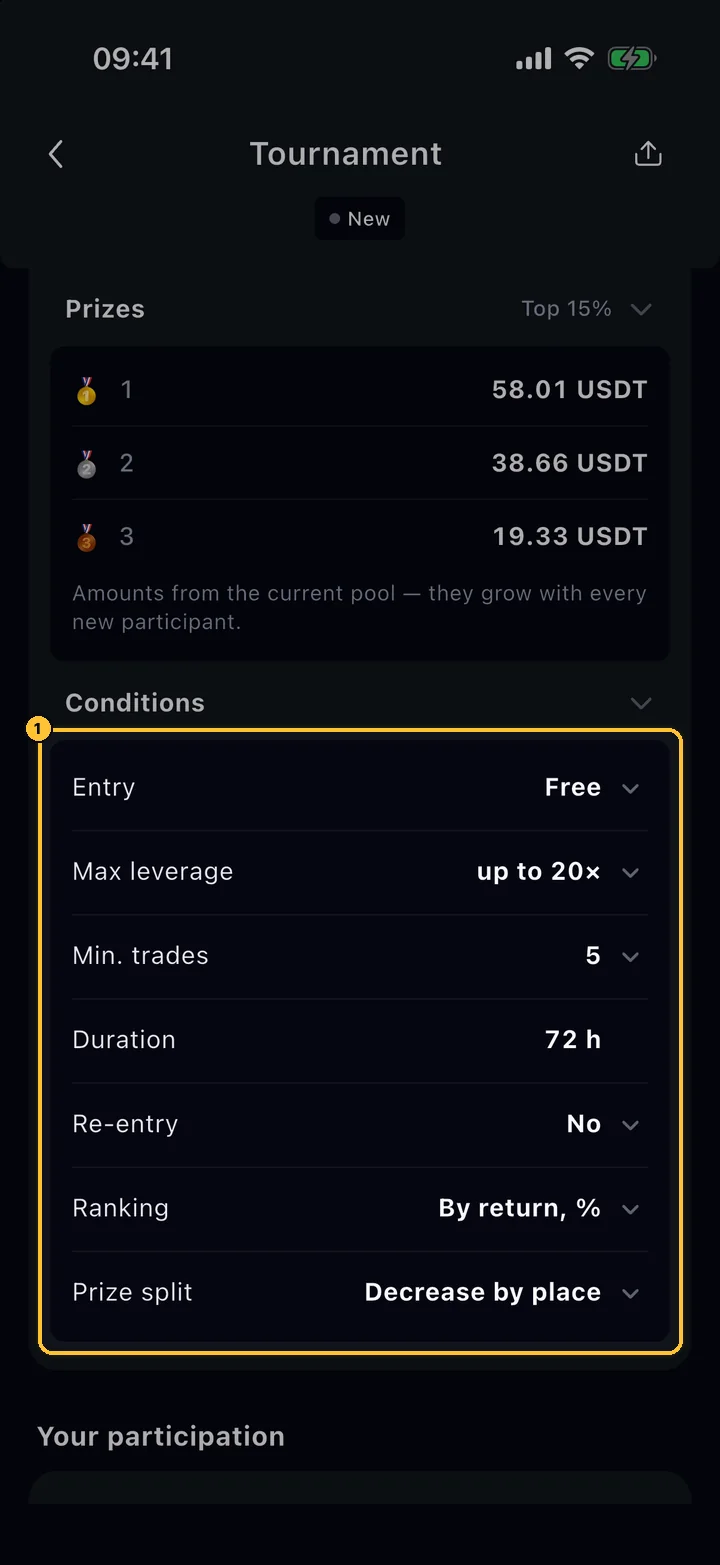
Conditions list: entry free, max leverage up to 20×, min trades 5, duration 72 h, re-entry no, ranking by return %, prize split decrease by place
Tournament › Conditions

Conditions

Tap any row with an arrow for the exact rule.

  1. 1Entry, Max leverage (per order, and your total exposure must stay within it), Min. trades to qualify for a prize, Duration, Re-entry, Ranking — by return (ROI) after trading fees, funding excluded — and Prize split.
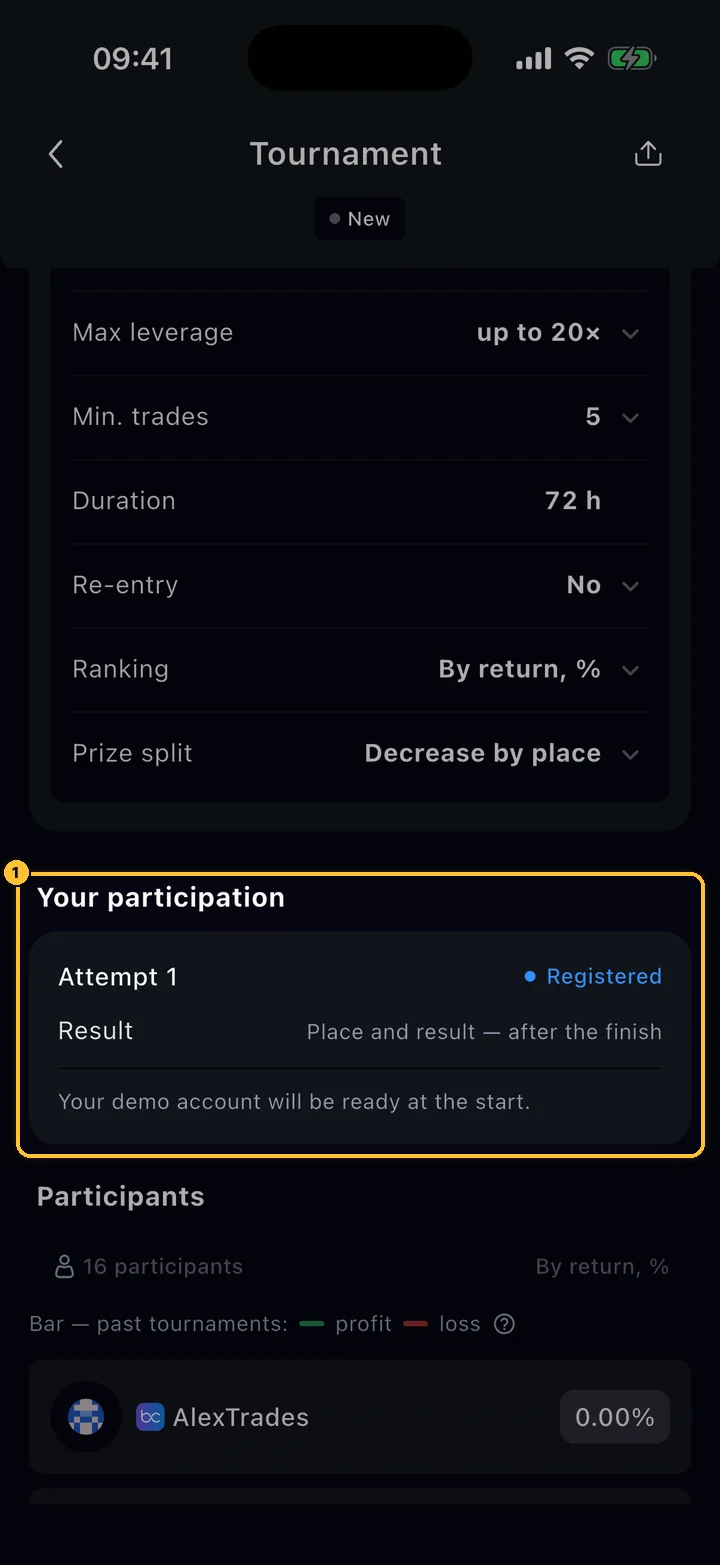
Your participation: Attempt 1, Registered, place and result after the finish, demo account ready at the start
Tournament › Your participation

Your participation

Your status and, after the finish, your place and result.

  1. 1Attempt 1 and its status. The demo account for the event is prepared at the start; the standings are published after the finish.

Close all positions before the finish: an open position is not part of the result. Breaking the leverage limit or making fewer trades than required removes prize eligibility.

09 Rules

Nine rules that decide the result.

They apply to regular tournaments. Progressive Guarantee events add their own conditions (step 08), and the organiser can add more in the description.

01

Only closed trades count

Your result is made of positions you closed during the tournament, on the tournament pair. An open position or a trade on another pair does not count.

02

Only trades after the start

Trades made before the start, or before you joined a running tournament, do not count. If the minimum number of players is reached late, the count starts from that moment.

03

Close before the end

A few minutes before the end, an open position on the tournament pair on your demo account is closed and its orders are cancelled. Positions on exchange accounts are not closed for you: close them yourself in time.

04

One tournament at a time

You can take part in one tournament at a time. The next one unlocks when the current one ends.

05

Prize only above zero

A prize needs a result above zero. If two players have the same result, the one who joined first ranks higher. Places nobody qualifies for are not paid.

06

Fee 0.08% per round trip

On the demo account each trade pays 0.04% when it opens and 0.04% when it closes. The fee is already inside your PNL and PMC result.

07

Liquidation

A liquidation on the demo account is a closed losing trade and counts as one. You owe nothing: it is demo money.

08

Minimum players

A tournament starts only when it has its minimum number of players. If it never gets there, it is cancelled and the entry is returned in the same currency.

09

Refresh delay

The leaderboard updates about once a minute. Closed a trade and your place has not moved yet? Wait a moment and pull to refresh.

DAfter the finish
10 Results

Who won, and where the prize went.

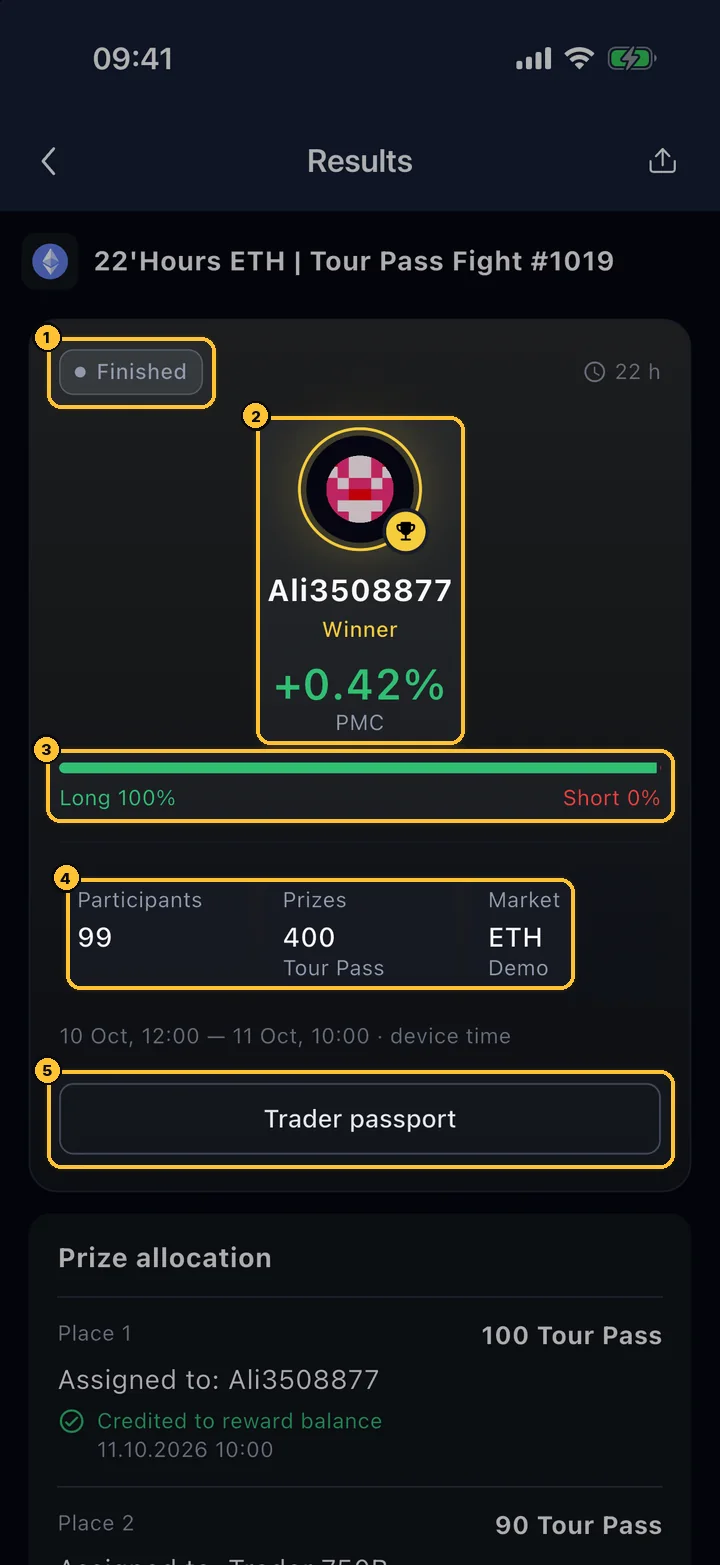
When a tournament ends, its page turns into Results. Prizes are credited automatically; there is nothing to claim.

Results of 22'Hours ETH Tour Pass Fight #1019: Finished, winner Ali3508877 with +0.42% PMC, Long 100%, 99 participants, 400 Tour Pass prizes, market ETH Demo, Trader passport
Tournaments › Ended › Show details

The summary

Open any ended tournament with Show details.

  1. 1Status: Finished or Cancelled, and how long it ran.
  2. 2The winner and the winning result.
  3. 3The winner's long / short split.
  4. 4Participants, the prize pool and the market (coin and account type).
  5. 5Trader passport of the winner.
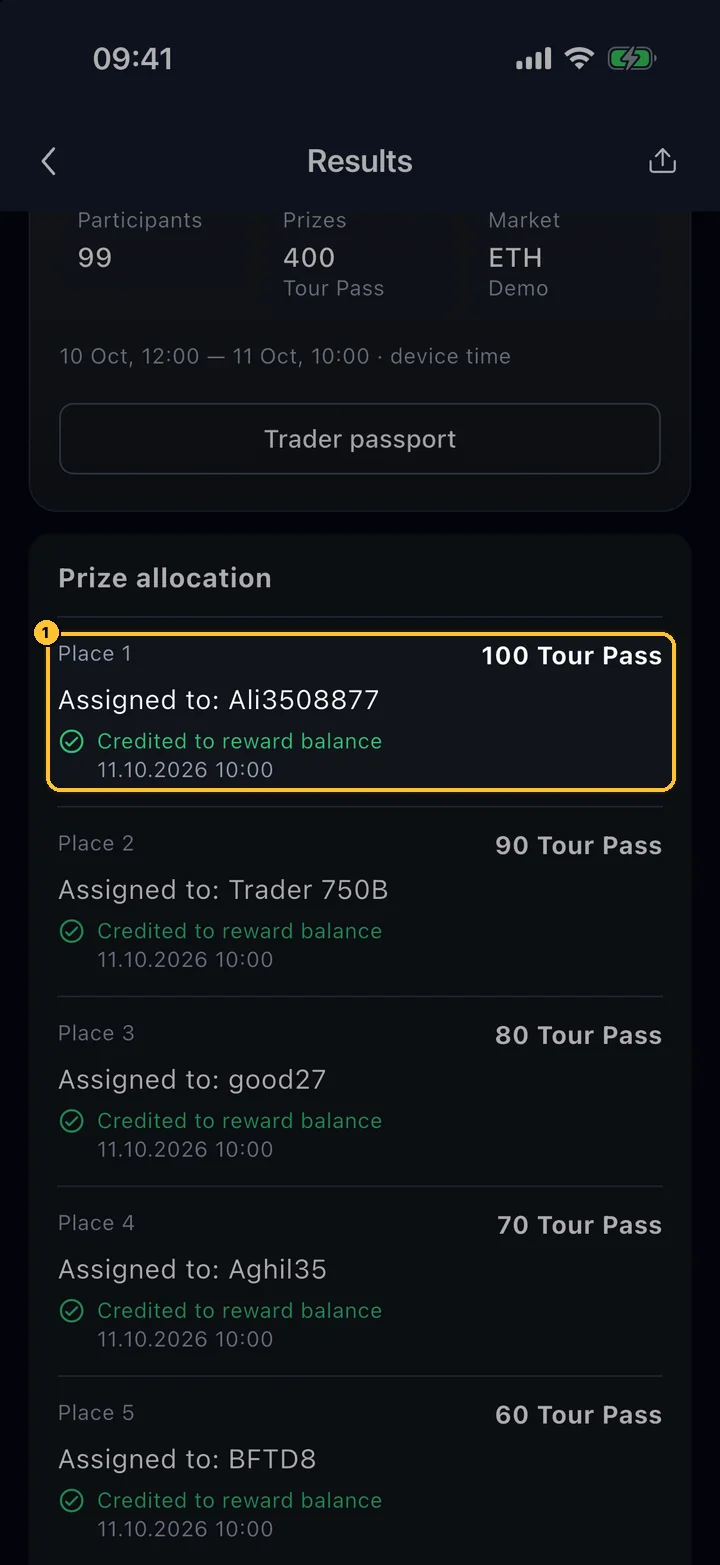
Prize allocation: Place 1, 100 Tour Pass, assigned to Ali3508877, credited to reward balance 11.10.2026 10:00
Results › Prize allocation

Prize allocation

Every paid place, who got it and the state of the payment. Below it: Final standings.

  1. 1A place, its prize, the winner and the status: Credited to reward balance, Credited to demo account (Demo USDT prizes), Awaiting credit, Prop account issued or Prize not awarded.

Tour Pass, BUYT and USDT prizes go to your BuyCrypt wallet (Portfolio › All assets), Demo USDT prizes to your demo account. USDT can be withdrawn to a TON wallet; every withdrawal is checked by the team before it is sent.

11 Trader path

From the first trade to USDT prizes.

My Profile › Trader path (also on the Portfolio screen) shows your next step and the tournament that fits it.

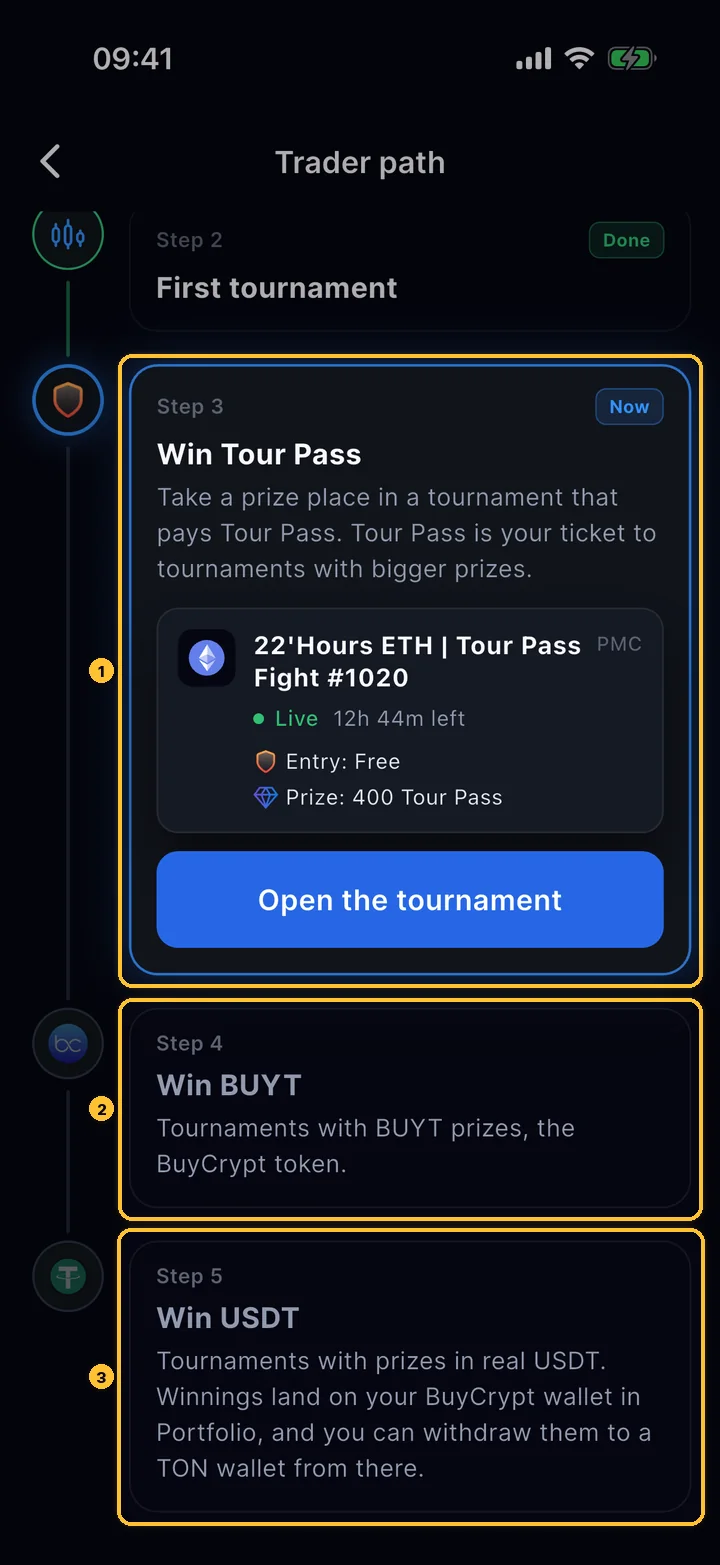
Trader path: Step 3 Win Tour Pass with a suggested free Tour Pass Fight tournament, Step 4 Win BUYT, Step 5 Win USDT
My Profile › Trader path

Five steps

First trade → first tournament → Tour Pass → BUYT → USDT.

  1. 1The current step, marked Now, with a tournament that fits it and Open the tournament.
  2. 2Win BUYT: tournaments with BUYT prizes.
  3. 3Win USDT: tournaments with prizes in real USDT. Winnings land in your BuyCrypt wallet in Portfolio.

Tournament rating

Every finished tournament changes your rating: a win and a top-3 place add points (more in bigger tournaments), a result above zero adds a little, a result at zero or below takes points away. The rating never goes below zero.

Tiers

Bronze from 0, Silver from 1,000, Gold from 1,500, Platinum from 2,000, Diamond from 2,500. Some tournaments are open only from a certain rating, shown on the card.

Trader passport

Your rating, wins, top-3 places and every tournament are collected in your Trader passport. Others see it when they tap your name on a leaderboard.

12 Schedule

What runs, and how you will know.

The regular series in October 2026. Names, prizes and dates of every round are always in the app.

Series
Format
Entry
Prizes
22'Hours ETH | Tour Pass Fight
FormatDaily · PMC · ETH
EntryFree
Prizes400 Tour Pass, top 5
Demo USDT Tour
FormatDaily · PNL · BTC
EntryFree
Prizes15,000 Demo USDT
BTC Battle
FormatWeekly · PNL · BTC
Entry100 Tour Pass
Prizes100 USDT, top 15

Notifications

The app tells you when your tournament is about to start, when it starts and ends, when you take first place or drop down the leaderboard, and when a tournament is cancelled. Allow notifications for BuyCrypt in the phone settings.

Favourite traders

Star a trader on a leaderboard and you will see when they enter a tournament in the Live tab.

Your own tournament

Paid tournaments created by users, with an entry in BUYT and 20% of the pool for the host, are coming to the app. How they will work: Create a tournament.

Start here

Find your first tournament.

Download the app, open the Tournaments tab and join the nearest free tournament. It runs on the demo account, so the only thing at stake is your place.

Free to start · Demo account · Age 18+
Keep reading

Related guides.