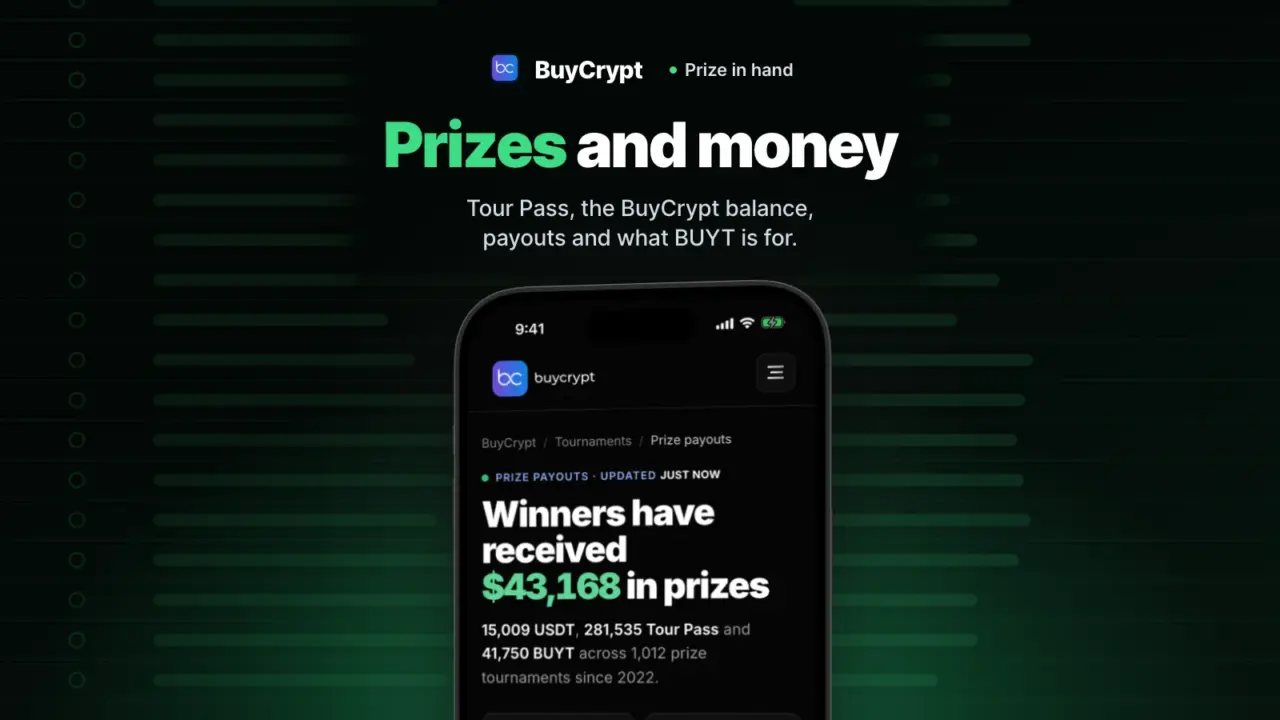
You won a tournament. Your prize is on one screen, and you withdraw it from there. Below: how you pay for entry, how the prize gets to your wallet, and how to check payouts yourself.
Prizes are credited in USDT and paid out in the BUYT token at the market rate at the time of payout (Terms, 8.2). You can withdraw from 1 USDT. Demo money is virtual. Prizes are real.
A ticket to prize tournaments, with no deposit
Reach tournaments with USDT prizes without paying in
What it is. Tour Pass is the BuyCrypt ticket. It pays the entry to tournaments with bigger prizes. You win it in free tournaments. You can also buy it: $0.10 each.
Why. No deposit. You risk no money. You win Tour Pass in free tournaments. BTC Battle entry is 100 Tour Pass. Every day the top five of the free 22’Hours ETH | Tour Pass Fight share 400 Tour Pass. Players have won 281,535 Tour Pass in tournaments so far (as of 17.11.2026, from the Prize payouts page).
How to start
- Open the Tournaments tab. Your Tour Pass balance is at the top.
- Join the free Tour Pass Fight and trade on the tournament account.
- A prize place adds Tour Pass to your balance.
- In a tournament with a Tour Pass entry, tap Join.
Where: the app and the web terminal. Rules: the Tour Pass page.
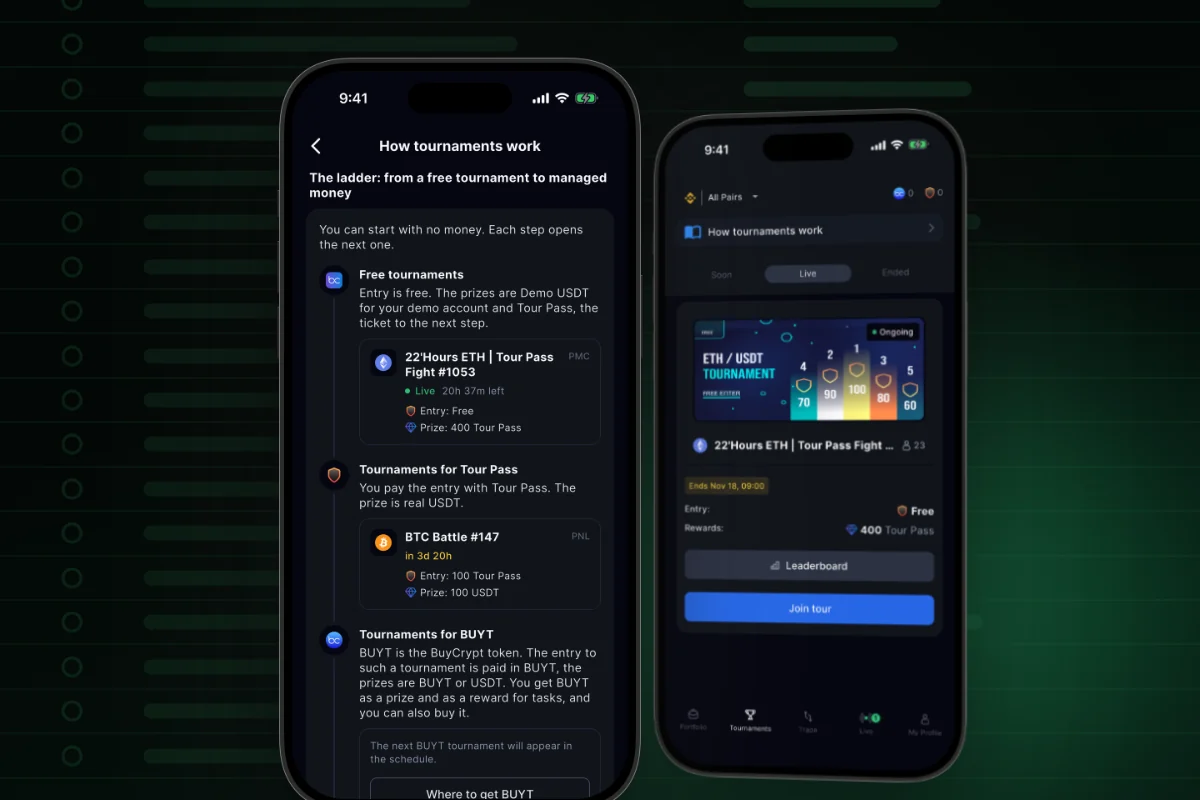
Tour Pass is not money and not cryptocurrency. You cannot withdraw it, exchange it back or give it away (Terms, 7.2). A Tour Pass entry is a paid entry: you pay with tickets. But you need no deposit.
Short on tickets? You can buy more
No need to wait for the next free tournament
What it is. You can buy Tour Pass in the app and in the web terminal. There are two ways to pay. Wallet uses USDT you won, from your BuyCrypt balance. Coinpayments takes crypto through a payment service.
Why. BTC Battle entry is 100 Tour Pass. If you have less, you buy the rest in a few minutes. The price is the same in every pack: $0.10 per Tour Pass. You see it before you pay.
How to start
- On the Tournaments tab, tap your Tour Pass balance at the top. Or tap the buy button when the app says you are short on Tour Pass.
- Pick how to pay: Wallet or Coinpayments.
- Pick a pack: 10 Tour Pass is $1, 100 is $10, 500 is $50, 1,000 is $100, 5,000 is $500. There is no volume discount.
- Pay. If you pay with crypto, wait for the payment check. Your balance updates by itself.
Where: the app and the web terminal, the Tournaments tab. Rules: the Tour Pass page.
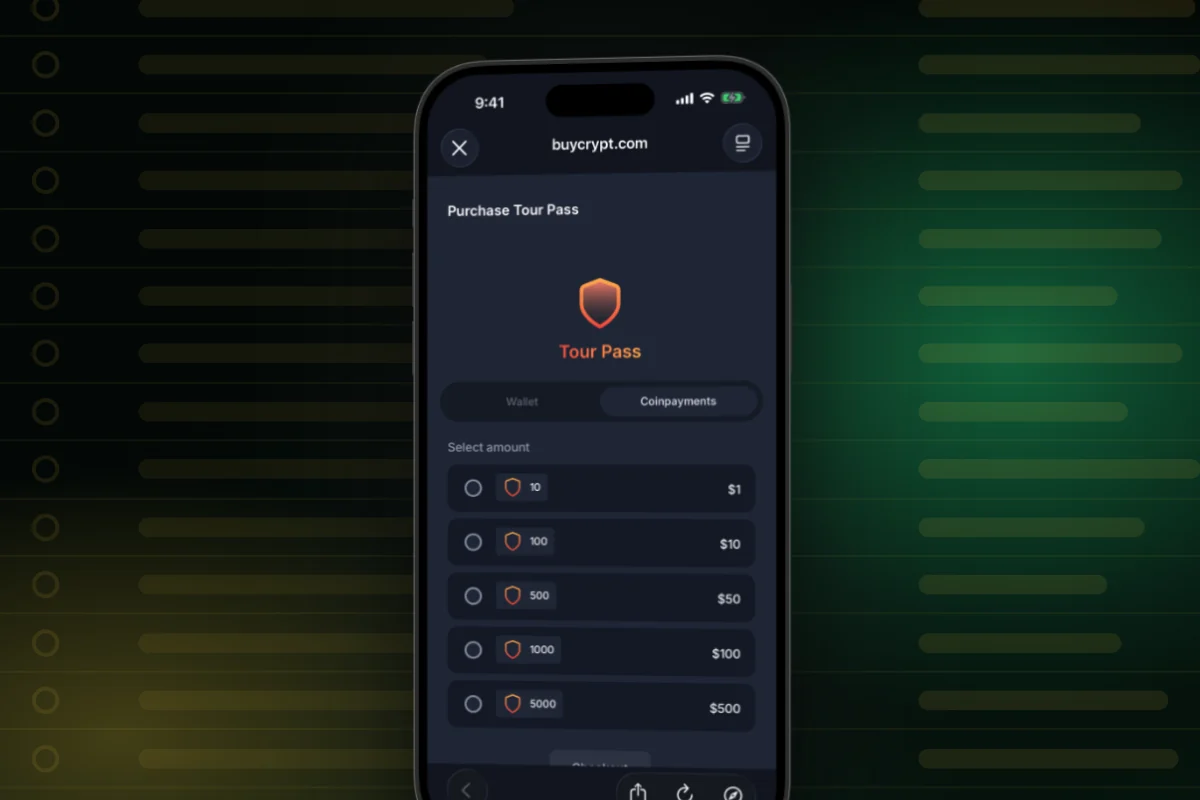
You do not have to buy. You win Tour Pass every day in the free Tour Pass Fight. No deposit. Bought Tour Pass is not refunded, except the entry refund when a tournament is cancelled. Cards and App Store or Google Play purchases are not accepted.
All your winnings on one screen
See at once how much you can withdraw
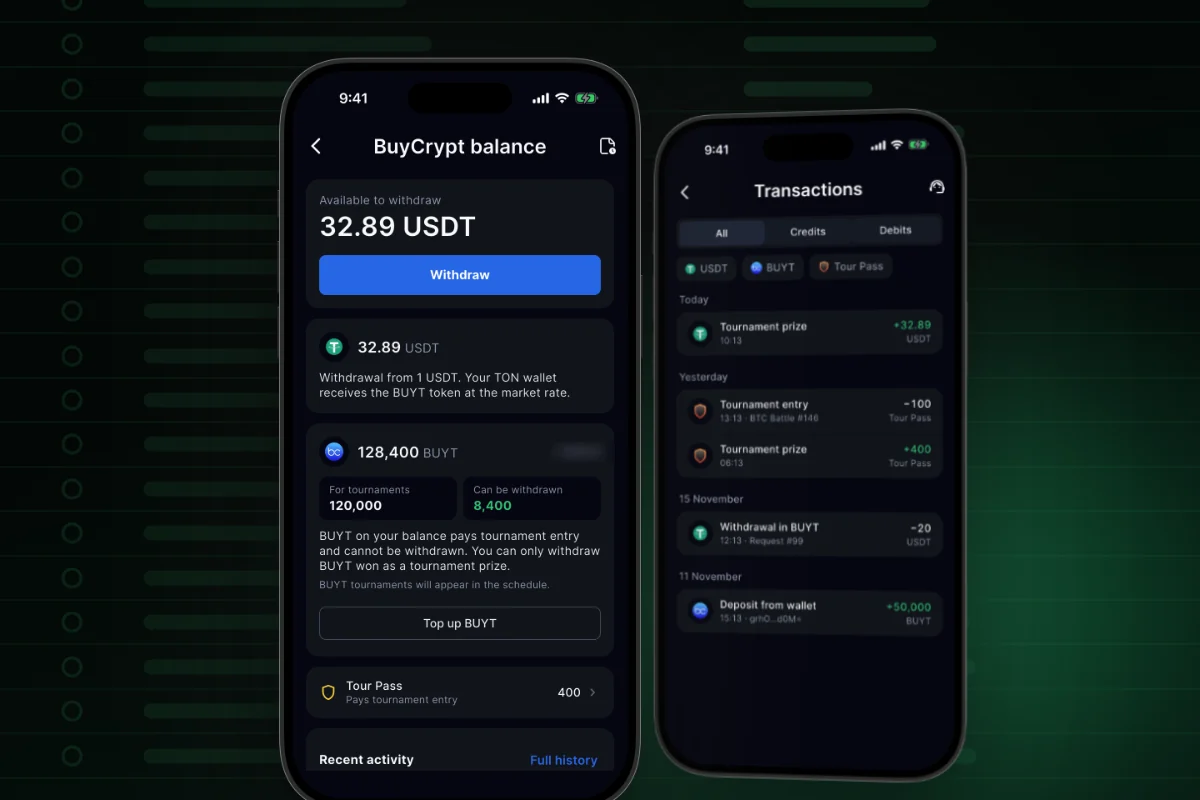
What it is. BuyCrypt balance shows all your prizes: USDT, BUYT, Tour Pass, open requests and recent activity.
Why. One number: Available to withdraw. One button: Withdraw.
How to start
- Open My Profile → BuyCrypt balance.
- At the top you see Available to withdraw and the Withdraw button.
- Below is the USDT card with the withdrawal rule.
- On the BUYT card, look at the chips: For tournaments and Can be withdrawn.
- At the bottom: Recent activity, a short guide on how to get the prize, and Support. An open withdrawal request shows its card with steps on this same screen.
Where: the app (My Profile → BuyCrypt balance) and the web terminal.
Withdraw a prize from 1 USDT
No need to save up: withdraw from 1 USDT
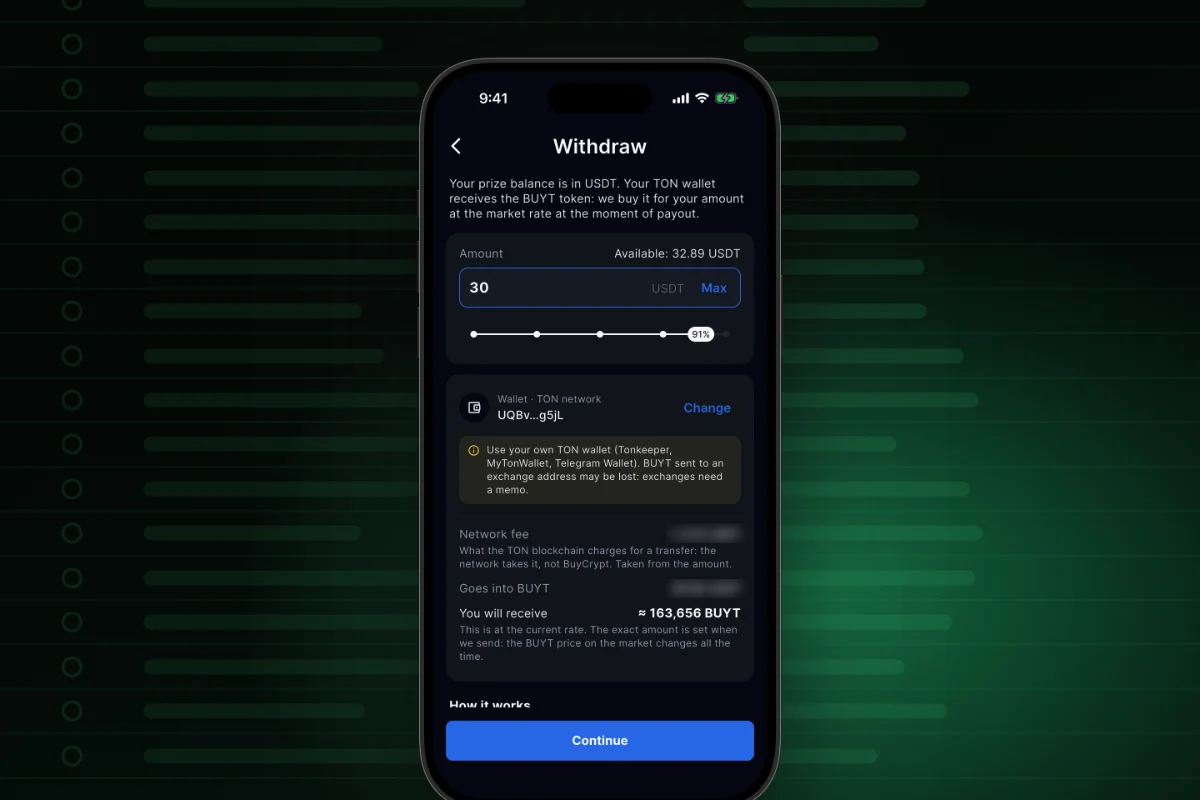
What it is. You withdraw your USDT prize balance. BuyCrypt buys BUYT on the market for that amount, at the rate at payout time, and sends it to your own TON wallet.
Why. You can take even a small prize. The form shows the network fee and the BUYT amount before you confirm.
How to start
- Open BuyCrypt balance and tap Withdraw.
- Type the amount in USDT or tap Max. The form shows Network fee, Goes into BUYT and You will receive.
- In the Wallet · TON network line, tap Add and connect your own wallet.
- Tap Continue, then Confirm in the “Withdraw N USDT in BUYT?” window.
- Watch the request card. At the end it says “Done: N BUYT sent” and gives a Transaction link.
Where: app 3.9.7 and the web terminal, one form as described. You see another Withdraw screen? Update the app. Rules: Terms, 8.2.
See where your request is, without writing to support
What it is. Each request has a card with four steps. It updates by itself, and you get a push about each change.
Why. You know which step your prize is on. If a request is declined, the USDT comes back to your balance.
How to start
- After you confirm, open BuyCrypt balance. The request card is there.
- The steps go in order: Review → Approved → Sent → Paid out.
- While you can still cancel the request, the card has a Cancel button.
- At the end, tap Transaction to see the transfer on the blockchain.
Where: the app and the web terminal. A tap on the push does not open the request yet: open BuyCrypt balance.
A request is usually processed within 24 hours, and most go through almost at once. The exact time is not guaranteed: some requests are checked by hand (Terms, 8.3). The token amount depends on the rate at payout time. After sending, the market risk is yours. Use your own wallet: BUYT sent to an exchange address may be lost.
Every balance change in one list
See why your balance changed
What it is. Transactions is one list of every credit and debit on your BuyCrypt balance: tournament prizes, tournament entries, entry refunds, withdrawals in BUYT, Tour Pass purchases and top-ups. Rows are grouped by day.
Why. You can check any change yourself: when, what for and how much. A withdrawal has a link to the transfer on the blockchain.
How to start
- Open BuyCrypt balance and tap Full history or the history icon.
- Switch between All, Credits and Debits. Filter by coin: USDT, BUYT, Tour Pass.
- Tap a row. The details show type, date, status, network, fee, tournament and number.
- In the details of a withdrawal, tap Transaction. The transfer opens in a block explorer.
Where: the app and the web terminal. The payout status is in plain words: under review, done, or declined with the money back on your balance.
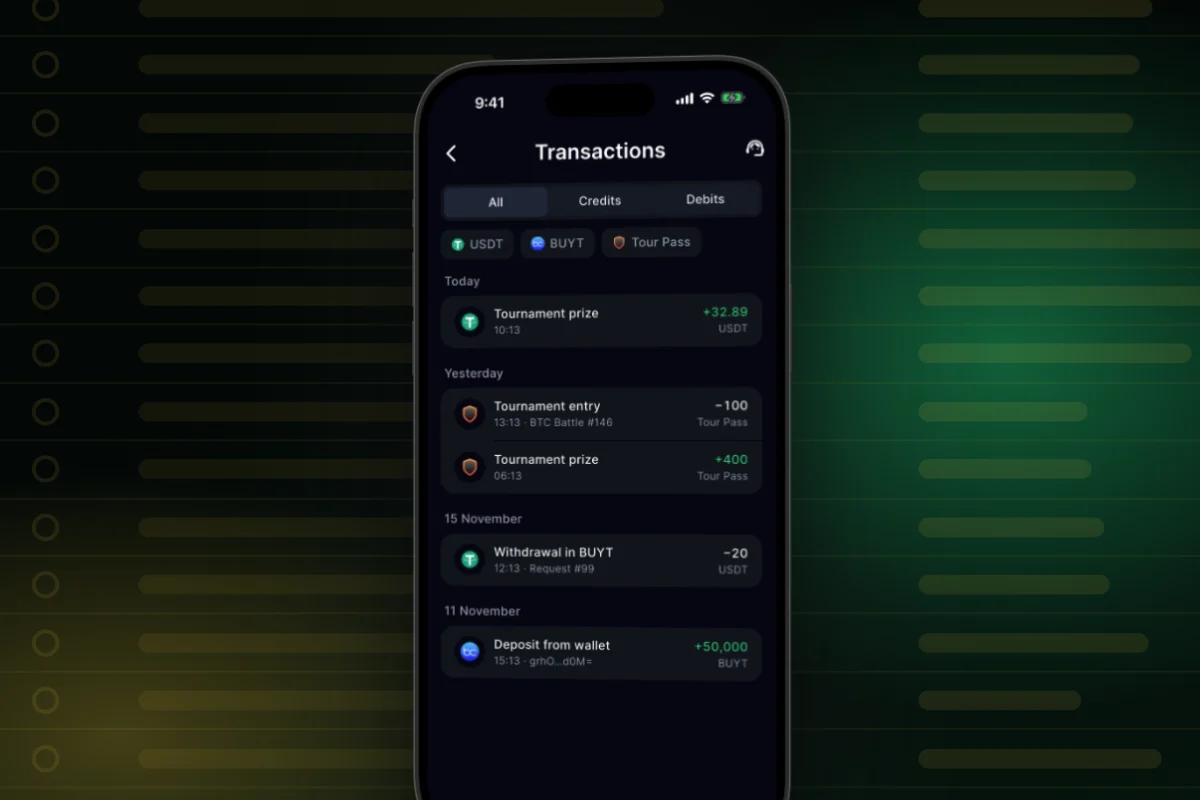
This is the history of your prize balance in BuyCrypt. It is not a bank or tax statement.
Check the payouts yourself
Prizes and payouts are public, with transaction links
What it is. The site has a public Prize payouts page. It says winners have received $43,168 in prizes (snapshot of 17.11.2026). That total is 15,009 USDT, 281,535 Tour Pass and 41,750 BUYT across 1,012 prize tournaments since 2022.
Why. You can open any wallet payout on the blockchain. You also see what the total is made of: by count, most prizes are Tour Pass.
How to start
- In the site menu, open Tournaments → Prize payouts.
- Find the table of in-app prizes by month: USDT, Tour Pass, BUYT.
- The feed of recent prizes shows who won and for what.
- In the wallet payouts block, open the transaction link in any row.
Where: the site, buycrypt.com/payouts. This page is not in the app.
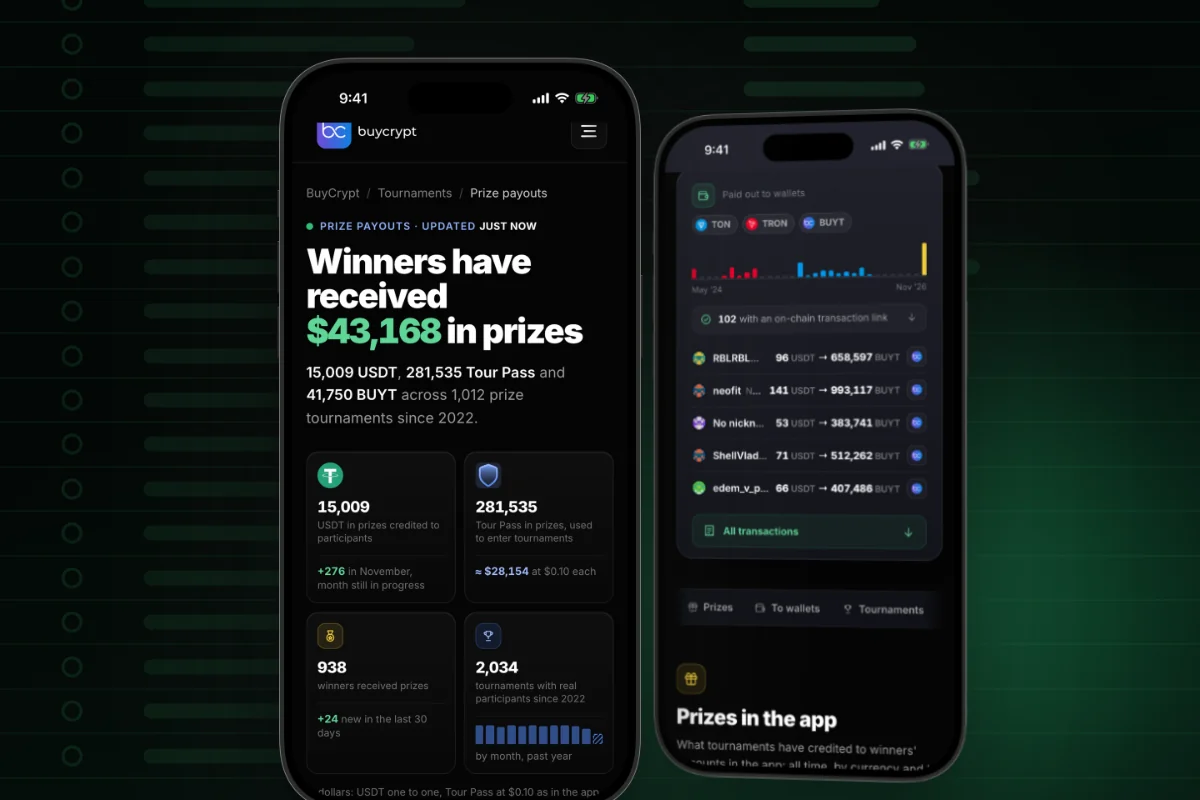
$43,168 is credited prizes. It is not the sum of withdrawals. By count, most prizes are Tour Pass: a ticket for tournament entry that you cannot withdraw. November 2026 payouts were made in BUYT, each row with a transaction link. The page updates by itself, every 15 minutes.
What BUYT is for
BUYT works inside BuyCrypt: prizes, entries, collateral, ideas
What it is. BUYT is the BuyCrypt token on the TON network. Prizes are paid out in it, and it pays for some features (Terms, 7.3).
Why. You know why some BUYT on your balance is marked For tournaments.
How to start
- See your BUYT in BuyCrypt balance.
- Tournament entry: the BUYT tournaments button, when such tournaments are in the schedule.
- Copying to your own exchange account: BUYT is locked as collateral while the copy runs. After a loss you get all of it back (Terms, 9.4). A profitable copy pays 10% of its profit.
- An idea for the platform: My Profile → Ideas. Posting one costs $1 in BUYT, at the rate at the moment of payment.
Where: the app and the web terminal. The For tournaments chip means this BUYT is spent inside the app. About the token: the BUYT page.
BUYT already on your balance (from rewards, for friends, or topped up) pays tournament entries. You cannot withdraw it. Only tournament prizes are paid out.
One person, one account. Making several accounts is not allowed (Terms, 15.1). Withdrawals are closed for such accounts (Terms, 8.8). Their prizes stay on the BuyCrypt balance. A mistake? Write to support.
Invite a friend: tickets for them, a bigger prize for you
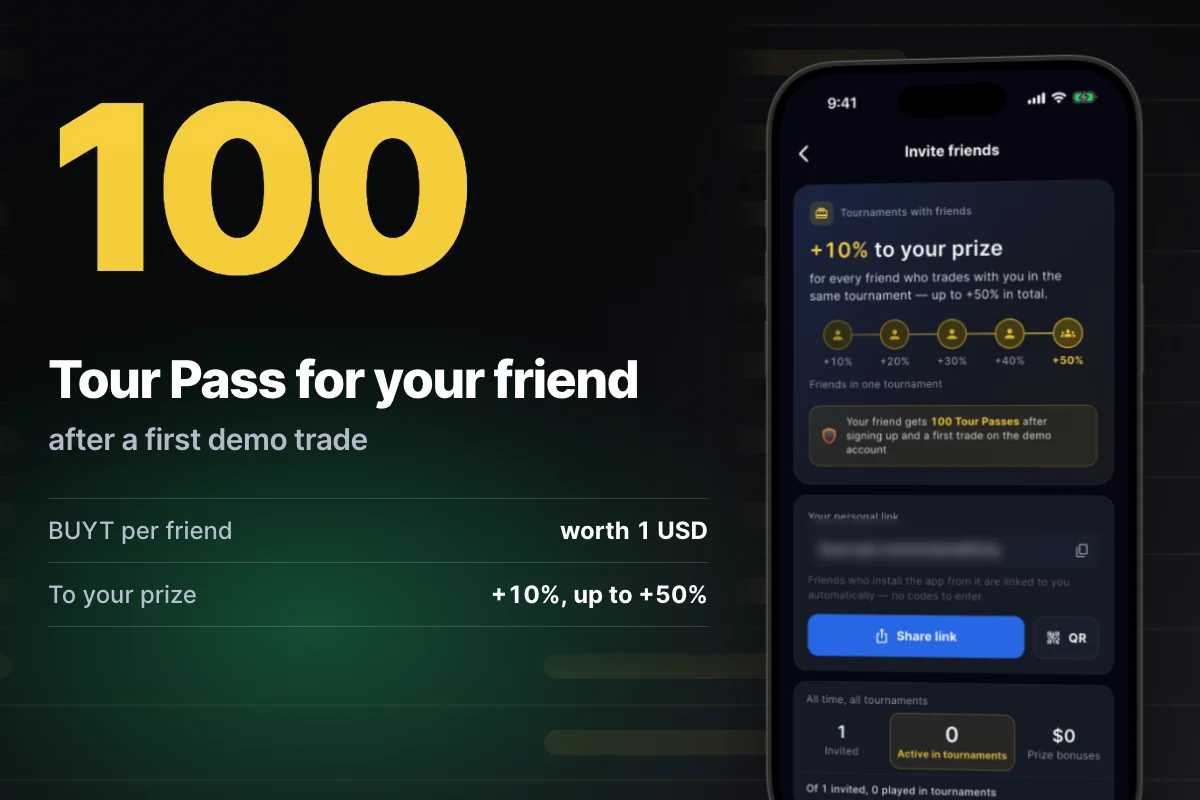
Your friend gets 100 Tour Pass, the entry to BTC Battle
What it is. You have a personal invite link. Your friend installs the app by it and is linked to you. No codes. After sign-up and a first trade on the demo account, your friend gets 100 Tour Pass.
Why. Your friend does not wait for a free tournament to reach one with USDT prizes. Your friends list shows who has joined.
How to start
- Open My Profile, then “Invite friends”.
- Tap “Share link” or show the QR code.
- Your friend installs the app by the link, signs up and makes a first trade on the demo account.
- Watch your friends list.
Where: the app and the web terminal, My Profile → “Invite friends”. Rules: How invites work.
More changes
- Top up BUYT. Three steps on one card: BUYT on the TON network only, the address, your User ID in the transfer comment. Any amount from 1 BUYT. Without the User ID the transfer is not credited. You can open your wallet from the card or pay by QR. Topped-up BUYT pays tournament entries and in-app features. You cannot withdraw it.
- Balance history. A block in your profile. It leads to BuyCrypt balance and Transactions.
- How to get the prize. A short guide at the bottom of BuyCrypt balance: three steps and a link to the tournaments guide.
- Not enough Tour Pass. If you are short for an entry, the app shows a window with a buy button.
- Real BUYT transactions on the site. The BUYT page has a live feed: transfers from the blockchain and in-app credits, refreshed once a minute, with a link to all transfers in Tonviewer. The app does not have this feed.
Good to know
- Payouts go only on the TON network and only in BUYT. Do not count on USDT in your wallet.
- The form shows the network fee before you confirm.
- You can cancel a request only while its card has the Cancel button.
- One open withdrawal request at a time. Small requests go through automatically. Large ones wait for a manual check.
- Five ways to get Tour Pass: Tour Pass Fight, a friend’s invite, channel giveaways, USDT you won, crypto.
- BUYT is not a security, a deposit or a promise of income (Terms, 7.4). No investment advice, no profit promises. 18+.
Links: tournaments guide · tournaments · prize payouts · web terminal · download: App Store, Google Play · back: Trade under control · all chapters.
Discussion
Comments from BuyCrypt Live. Sign in with Google or Apple — we create your BuyCrypt account on the way, the same one as in the app.